
ESET Security
ESET
November 18, 2026
85.59 MB
19.2.10.0
Windows 10 / 11 (64-bit / 32-bit)

Images


Description
ESET Security is a protection suite for your PC. It scans files as you open them, checks the sites you visit and watches network traffic for anything odd. Most of the work happens in the background, so you only notice it when it blocks something.
ESET is a Slovak company that has built security software for decades. Its home range comes in tiers. The basic tier, NOD32 Antivirus, covers malware. Internet Security adds a firewall and more privacy tools. The top tiers add extras such as file encryption and identity monitoring. Tier names change now and then, and not every tool comes in every tier. ESET publishes a list of which features each home product includes, so check it before you pick a plan.
What ESET Security Actually Does
Think of it as three layers.
The first layer looks at files. Anything you download, copy from a USB drive or open from an email gets checked against ESET’s detection engine and its cloud reputation database.
The second layer looks at behaviour. Say a program that seemed harmless starts encrypting your documents. ESET sees that pattern and steps in, even if the file was never flagged before.
The third layer looks at the network. It filters bad traffic, blocks fake websites and stops an infected PC from being used in attacks on others.
No single layer catches everything. That is why the suite stacks them.
Key Features
Here are the tools you will meet most often. Some depend on your plan.
- Real-time antivirus and antispyware. The core scanner. It finds viruses, trojans, worms, adware, rootkits and spyware when files are opened, copied or run.
- Advanced machine learning. Flags malware nobody has seen before by studying how a file is built and what it tries to do. It uses little CPU for this.
- Ransomware Shield. Blocks programs that try to lock your files and demand money. For many home users this is the feature that matters most.
- Exploit Blocker. Watches the apps attackers like to abuse, such as browsers, document readers and email clients. It targets attacks built to slip past ordinary antivirus.
- Script-based attack protection. Catches harmful PowerShell scripts and JavaScript attacks that arrive through a browser.
- HIPS. A host-based intrusion prevention system. It watches system behaviour and blocks suspicious changes. Advanced users can write their own rules.
- UEFI Scanner. Checks the firmware layer that loads before your operating system starts.
- Cloud-powered scanning. Skips files already known to be safe, so repeat scans finish faster.
- Anti-phishing. Blocks fake login pages and fake banking pages before you type anything into them.
- Firewall and network attack protection. The firewall controls which programs reach the internet. Network attack protection looks for dangerous traffic patterns. The firewall comes with Internet Security and the tiers above it.
- Botnet protection. Stops your PC from being used to send spam or join network attacks.
- Banking and payment protection. Opens banking sites in a secured browser mode. It also encrypts the link between your keyboard and the browser, which helps against keyloggers.
- Webcam protection. Alerts you when an app tries to use your webcam. You can block it.
- Parental control. Blocks websites by category or by individual address.
- Anti-Theft. Helps you locate and lock a laptop that went missing.
- Gamer Mode. Switches ESET to silent mode when a program runs full-screen. No pop-ups, and less CPU use.
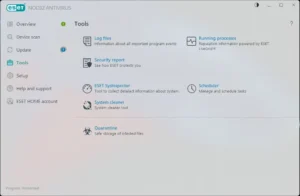
- Security report. A monthly summary of threats found, pages blocked and similar events.
The higher tiers add a few more. Secure Data encrypts files and USB drives. Identity protection watches the dark web for leaked personal data. ESET LiveGuard sends suspicious files to a cloud sandbox and tests them there, so the file never runs on your PC.
Where ESET Security Fits: Use Cases
A shared family PC. One computer, several users, very different habits. Kids click things. Parental control keeps them off sites you don’t want them on, and anti-phishing catches the fake prize pages that show up in messages.
A gaming PC. Gamers hate pop-ups and slowdowns. Gamer Mode handles the first problem. The light system footprint handles the second, though no scanner is completely free of cost.
Online banking and shopping. You enter card details and passwords on these sites, so they attract attackers. The secured browser mode and anti-phishing are built for exactly this.
Freelancers and remote workers. Your laptop holds client files, invoices and logins. Ransomware Shield protects the files. Anti-Theft helps if the laptop is lost on a train or at a café. Webcam protection is useful on video-call days.
Small shops and offices. Many small businesses run billing or accounting software on one or two PCs. Losing that data hurts. ESET’s home range is meant for homes and small offices, so a shop owner can use it without buying a full business package.
Older or modest hardware. Some security suites make a slow PC slower. ESET aims for a small footprint and uses cloud checks to skip safe files. On older machines this usually matters.
Setting It Up
The install takes a few minutes. Follow this order and you avoid most problems.
- Remove any other antivirus first. Two real-time scanners fight each other and slow the PC down.
- Download the installer from a source you trust.
- Run it and follow the prompts.
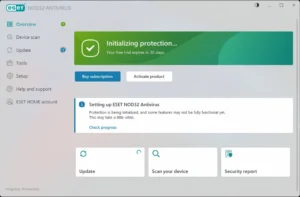
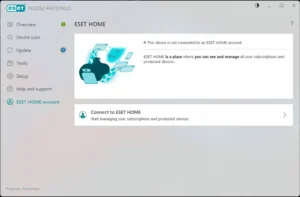
- Activate it with your licence key, or start a trial. You may be asked to sign in to an ESET HOME account, which lets you manage your protection from one place.
- Wait for the first update to finish. The detection engine needs current data before it is useful.
- Run a full scan. It takes a while, so start it when you are not using the PC.
- Open the setup screen and check that the main protection modules are switched on.
If you play games or give presentations, look at the Gamer Mode setting at this stage. Some people prefer it automatic.
Performance in Daily Use
Light use shows little impact. ESET uses multithreaded scanning to spread the work over your processor cores, and the cloud reputation check skips files it already trusts.
Now, the honest part. The first full scan is heavy on any antivirus. Expect the fan to spin and the PC to feel slower for a while. After that, scans run faster because ESET remembers what it already checked.
ESET Security vs Microsoft Defender
Microsoft Defender comes built in and costs nothing. It gives decent basic protection, and many careful users never add anything else.
ESET makes more sense when you want extra tools in one place. Banking protection, webcam alerts, parental control, a configurable firewall and monthly reports are all part of the paid tiers. Support is also a factor. ESET offers email and phone help, and a built-in tool does not.
Lab results shift from year to year. Before you decide, read recent tests from independent labs such as AV-Comparatives or AV-TEST. Do not rely on a vendor’s own marketing, ESET’s included.
Pros and Cons
Pros
- Strong layered protection against ransomware and unknown malware
- Small system footprint and cloud-assisted scanning
- Gamer Mode keeps pop-ups away during full-screen use
- Banking protection, webcam protection and parental control in the right tiers
- Free email and phone support
- A clean interface that beginners can handle
Cons
- It costs money, and Microsoft Defender costs nothing
- Several tools only come with the higher tiers
- The firewall and HIPS settings can confuse beginners
- The first full scan takes time
Skip Cracked Copies
You will find “cracked” or “keygen” versions of security software all over the web. Do not use them. Nothing is a worse idea than installing a pirated antivirus.
Attackers know people search for these files. A cracked installer often carries the very malware it claims to stop. Even a clean crack cannot update, and an antivirus that cannot update goes out of date within days. If the price is a problem, start with a trial and compare it against Microsoft Defender before you spend anything.
FAQ
Is ESET Security a free antivirus?
No. It is a paid product. ESET offers a trial so you can test it first.
Does ESET Security work on Windows 11?
Yes. ESET lists current Windows 10 and 11 as supported. Some features are limited on ARM-based devices.
Will it slow down my PC?
Slightly, mostly during the first full scan. Daily use is light, and Gamer Mode cuts activity during full-screen programs.
Do I need it if I already use Microsoft Defender?
Not always. If you are careful online, Defender may be enough. ESET helps most when you want the firewall controls, banking protection, parental control and support.
Can I run it next to another antivirus?
No. Remove the old one first. Two real-time scanners cause conflicts.
Does ESET Security protect against ransomware?
Yes. Ransomware Shield blocks programs that try to lock your files, and higher tiers add more recovery tools.
What's new
- New: SOHO: Web control in ESET Small Business Security
- New: SOHO: Network attack protection in ESET Safe Server
- New: Browser privacy & security: AI Conversation Security available for Premium, Ultimate, Small Business Security)
- Improved: SHA256 enabled by default - initial scan must run
- Improved: Import export split into two separate windows
- Improved: Added unified option to adjust headers in lists
- Bugfixes
Download links
How to install ESET Security?
1. Download the ZIP file.
2. Install the Split APKs Installer application
3. Open the application and click on "Install APKs".
4. Find the folder where the downloaded ZIP is located and select it.
5. Follow the steps that appear on the screen.
-
Popular Apps
-
 Visual Studio Code1.146.0 Microsoft
-
 Mister Download Manager0.5.2 Ahmed Nefzaoui
-
 Malwarebytes5.7.3.376 Malwarebytes
-
 qBittorrent5.3.0 Christophe Dumez
-
 TeraCopy4.0.5 Code Sector
-
 SUPERAntiSpyware27.0.0.1292 RealDefense LLC
-
 Wireshark4.6.9 Gerald Combs
-
 ESET Security19.2.10.0 ESET
-
 PowerToys0.102.3101 Microsoft
-
 Zoom Workplace7.2.51704 Zoom Communications Inc
-