
SUPERAntiSpyware
RealDefense LLC
November 7, 2026
28.23 MB
27.0.0.1292
Windows 10 / 11 (64-bit / 32-bit)
Images


Description
Your browser homepage changed overnight. Pop-ups show up on sites that never had them. The PC feels slow, though you installed nothing new. These are the usual signs of spyware or adware, and SUPERAntiSpyware exists to find and remove exactly that kind of junk.
It is a Windows security tool that scans your drives, memory and registry for hidden threats. It focuses on spyware and adware, so it is smaller and lighter than a full security suite. Many people keep it as a second opinion next to their main antivirus.
What is SUPERAntiSpyware?
SUPERAntiSpyware is an anti-malware scanner. It looks for software that watches what you do, shows ads you never asked for, or changes your settings without permission.
Spyware is the main target. It sits quietly in the background and records browsing habits, typed text or personal details. Adware pushes pop-ups and banners, and sometimes redirects your searches. Both often arrive bundled with free downloads, so most people never notice the install.
The program also handles other threats:
- Trojans and worms
- Rootkits that hide deep in the system
- Keyloggers
- Browser hijackers
- Dialers
- Rogue security programs that pretend to be antivirus tools
- Tracking cookies
The official website lists the current feature set and editions, so check it before you pick one: SUPERAntiSpyware official website.
Who should use it
Not everyone needs it. Some people will get a lot out of it, others very little.
It suits you if your PC is already acting strangely and your current antivirus says everything is fine. It also suits you if you download a lot of free software, since freeware installers are a common source of adware. And if you run an older machine, the light footprint matters. A heavy security suite can slow a weak PC more than the threats do.
It is a poor fit if you want one product to handle everything. There is no firewall and no password manager here. No secure browser either. Think of it as a specialist, not a replacement for your main protection.
Main features
Multiple scan modes
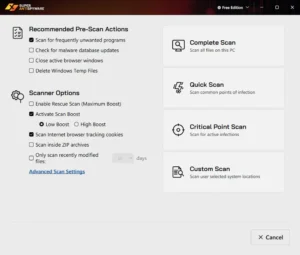
You choose how deep to look. A quick scan checks the places where threats usually hide, such as running processes and startup entries. A complete scan goes through every file on your selected drives. A critical point scan checks the most sensitive system areas. A custom scan lets you pick the exact folders or drives.
Use the quick scan for a daily check. Save the complete scan for when something feels wrong.
Detection of hidden threats
The scanner looks at memory, the registry and files. That matters because modern spyware rarely sits in one obvious file. It often spreads small pieces across several locations so that deleting one piece does nothing. SUPERAntiSpyware checks all of those places in one pass.
Quarantine and removal
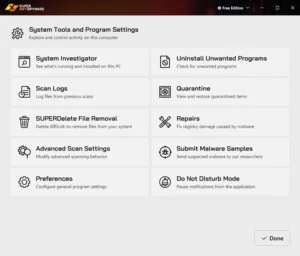
Found threats go to quarantine instead of being deleted at once. You can review them, restore a file if it was a false alarm, or remove it for good. This is useful when a scan flags a program you actually use.
Repair tools
Malware often breaks things on its way out. It can block Task Manager, disable registry editing or change your desktop and network settings. The repair options help you undo this kind of damage. Fixing the infection and leaving the damage behind would be only half the job.
Trusted items list
Some programs trigger warnings every time, especially custom tools or older software. You can add a file or folder to a trusted list so the scanner skips it. Use this carefully, and only for software you know well.
Scan logs and reports
Every scan leaves a record. You can see what was found, what was removed and when. Anyone who looks after a family PC or a small office machine will find this handy.
Adjustable scanner speed
You can lower the scanner’s priority so it uses less CPU. A scan then takes longer, but you can keep working while it runs. On a slow computer, that setting makes a real difference.
Free vs Professional edition
SUPERAntiSpyware comes in a free edition and a paid Professional edition. The difference is simple, and it is important to understand before you install.
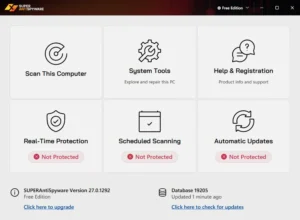
The free edition is a manual scanner. You open it, run a scan, and remove what it finds. It does not watch your PC in the background. Automatic updates and scheduled scans are also missing, so you have to update the definitions yourself before each scan.
The Professional edition adds the following:
- Real-time protection. It blocks threats the moment they try to run, instead of waiting for your next scan.
- Scheduled scans. You pick the time and type of scan, and it runs without you.
- Automatic updates. The threat database refreshes on its own, so you scan with current definitions.
- Email notifications. You can get scan results sent to you.
Which one should you pick? If you only want to clean an existing infection, the free edition does the job. If you want ongoing protection, the Professional edition is the one that actually watches your PC. A manual scanner cannot stop a threat that has not been found yet.
The Professional edition usually offers a trial, so you can test the real-time features before paying.
Does it work with your existing antivirus?
Yes, in most cases. That is one of its biggest selling points.
Two real-time antivirus programs on one PC usually fight each other. They scan the same files, slow the system down and sometimes crash. SUPERAntiSpyware was built to avoid that problem. The free edition has no real-time component, so it cannot clash at all. The Professional edition is designed to run beside another security product.
A common setup looks like this. Your main antivirus handles daily protection. SUPERAntiSpyware runs a scan once a week as a second opinion. If it finds something your main tool missed, you have caught a gap.
How to use SUPERAntiSpyware
The steps are short, even if you have never used a scanner before.
- Download the installer from a trusted source and run it.
- Open the program and update the definitions first. An old database misses new threats.
- Pick a scan type. Choose a quick scan if you are unsure.
- Start the scan and let it finish. Closing the window early can leave the job half done.
- Read the results. Look at each item before you remove it.
- Remove the threats you recognize as harmful. Anything you trust can go on the trusted list.
- Restart the PC if the program asks you to. Some threats only disappear fully after a reboot.
Run a second scan after the restart. If it comes back clean, the cleanup worked.
Real use cases
Browser keeps redirecting. Your search results open strange sites, or your homepage changes back every time you fix it. A browser hijacker is the usual cause. A complete scan normally finds it, and the repair tools can help reset what it changed.
Pop-ups on a clean PC. You see ads even with the browser closed. That points to adware installed alongside some free program. Scanning removes the adware, and it also shows you which download brought it in.
A family computer. Kids and relatives click on things. A weekly scheduled scan, in the Professional edition, catches problems before they grow. The logs tell you what happened.
An older machine. A slow PC cannot always handle a modern security suite. This tool is light enough to run as a regular check without making things crawl.
After a suspicious download. You installed something and now feel unsure. A quick scan takes a few minutes and settles the question.
Technicians and freelancers. Anyone who fixes other people’s PCs can keep it in a toolkit. It is a handy second tool when the first scanner finds nothing but the customer still sees symptoms.
What it cannot do
No scanner catches everything, and this one has limits you should know about.
It is not a full antivirus replacement. Independent reviewers have pointed out weaker results against newer threats such as ransomware, compared with the big security suites. So do not rely on it alone, especially if you handle banking or work files on the same PC.
The free edition protects nothing between scans. A threat that arrives on Tuesday sits there until you scan again.
It also has no firewall, no web filtering and no extras like a VPN. Those features come from other tools.
Finally, it is built for Windows. If you use other devices, they need their own protection.
Tips to get better results
- Update the definitions before every scan if you use the free edition.
- Run a complete scan at least once a month, even if nothing looks wrong.
- Do not add items to the trusted list just to silence a warning. Check what the file is first.
- Close heavy programs before a complete scan. It finishes faster.
- Restart after removing threats. Leftover pieces sometimes stay active until then.
- Be careful with installers. Choose the custom install option and untick any extra toolbar or “offer” you do not recognize.
- Keep Windows and your browser updated. Many infections get in through old security holes, not through bad downloads.
Frequently asked questions
Is SUPERAntiSpyware free?
There is a free edition for manual scanning. The Professional edition is paid and adds real-time protection, scheduled scans and automatic updates.
Can I use it with Windows Defender or another antivirus?
Yes. It is designed to work next to another security product. Many people use it as an extra scanner.
Will it slow my computer down?
It is a light program. A scan uses some CPU while it runs, but you can lower the scanner priority so it stays out of your way.
Can it remove adware and browser hijackers?
Yes. These are its main targets. It also removes tracking cookies, trojans and other common threats.
Do I need the Professional edition?
Only if you want protection that runs on its own. For a one-time cleanup, the free edition is enough.
Is it a replacement for a full antivirus?
No. Use it alongside one, not instead of one.
What's new
- See full release notes: https://www.superantispyware.com/producthistory.html?id=SUPERANTISPYWAREFREE
Download links
How to install SUPERAntiSpyware?
1. Download the ZIP file.
2. Install the Split APKs Installer application
3. Open the application and click on "Install APKs".
4. Find the folder where the downloaded ZIP is located and select it.
5. Follow the steps that appear on the screen.
-
Popular Apps
-
 Visual Studio Code1.146.0 Microsoft
-
 Malwarebytes5.7.3.376 Malwarebytes
-
 Mister Download Manager0.5.2 Ahmed Nefzaoui
-
 WireGuard1.1.1 Jason A. Donenfeld
-
 qBittorrent5.3.0 Christophe Dumez
-
 TeraCopy4.0.5 Code Sector
-
 SUPERAntiSpyware27.0.0.1292 RealDefense LLC
-
 Wireshark4.6.9 Gerald Combs
-
 ESET Security19.2.10.0 ESET
-
 PowerToys0.102.3101 Microsoft
-