
GBWhatsApp
April 26, 2026
94.8 MB
25.8.35
Android

Images
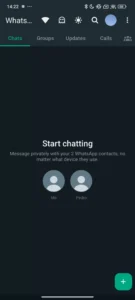
Related apps




Description
If you’ve ever felt limited by the official WhatsApp application — wishing you could hide your online status, schedule messages, or customize your interface beyond a handful of wallpapers — you’re not alone. Millions of Android users around the world have turned to GBWhatsApp, one of the most popular WhatsApp MODs ever created, to unlock a far more powerful and flexible messaging experience.
Table of Contents
But what exactly is GBWhatsApp? Is it safe to use? How do you install it? And what are the risks? This comprehensive guide covers everything you need to know about GBWhatsApp in 2026 – from its core features and privacy tools to installation steps, troubleshooting, and the best alternatives available today.
What Is GBWhatsApp?
GBWhatsApp (often written as GB WhatsApp or WhatsApp GB) is a third-party modified version of the official WhatsApp messaging application developed by Meta. It is not created or endorsed by Meta in any way — instead, it is built and maintained by independent developers who reverse-engineer the original app and add new functionality on top of it.
At its core, GBWhatsApp does everything the official WhatsApp does: you can send text messages, voice messages, photos, videos, documents, and make voice or video calls. What sets it apart, however, is a rich layer of additional features that Meta has never officially introduced into WhatsApp — and in some cases, never will.
This type of modified application is commonly referred to as a MOD APK. MOD APKs are widely used across the Android ecosystem for apps and games, offering users features and flexibility that the original developer has locked away or simply hasn’t built. GBWhatsApp is arguably the most well-known WhatsApp MOD in existence, having accumulated tens of millions of downloads across the globe.
The app is most commonly distributed as an APK file — an Android application package that you download and install manually, outside of the Google Play Store. This is because Google does not allow modified or unofficial versions of apps on its platform.
Why Do People Use GBWhatsApp?
There are several compelling reasons why users choose GBWhatsApp over the official app:
- Advanced privacy controls that go well beyond what Meta offers
- Deep interface customization including themes, color schemes, and fonts
- Productivity features like message scheduling and auto-reply
- Dual account support — run two WhatsApp accounts on one device
- Ghost mode — use WhatsApp completely invisibly
- Larger file sharing limits compared to the official app
For users who find WhatsApp too limited or too restrictive, GBWhatsApp offers a compelling proposition. But it comes with trade-offs — and understanding those trade-offs is essential before you decide to make the switch.
What’s New in GBWhatsApp 2026?
Each new version of GBWhatsApp is typically released in close succession to a new update of the official WhatsApp app. This ensures that users of the MOD don’t miss out on features introduced by Meta, while also benefiting from the additional tools exclusive to GBWhatsApp.
Here is a look at what’s new and notable in GBWhatsApp 2025:
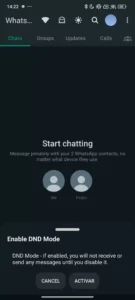
Do Not Disturb (DND) Mode
Despite the familiar name, the Do Not Disturb mode in GBWhatsApp functions similarly to your phone’s Airplane Mode — but only for the app itself. When activated, it cuts off GBWhatsApp’s internet access entirely. This means you won’t receive any incoming messages, and you won’t be able to send any either. This is useful when you want to take a break from WhatsApp without physically disconnecting your phone from the internet.
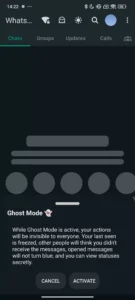
Ghost Mode
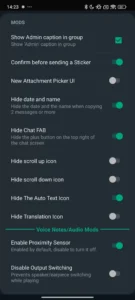
Ghost Mode is one of the most sought-after features in GBWhatsApp. When activated, it creates the illusion that you aren’t using WhatsApp at all. It prevents your last-seen timestamp from being updated, stops read receipts from being sent, and even allows you to view someone’s status updates without them knowing you’ve seen it. It is, essentially, a comprehensive invisibility cloak for your WhatsApp usage.
Dark Mode from the Chat List
While the official WhatsApp now offers a dark mode, GBWhatsApp takes it further by allowing users to toggle dark mode directly from the main chat list — no need to dig through settings menus.
Fast Access Profile Shortcut
GBWhatsApp places your profile picture directly in the app’s top bar, allowing you to jump into your profile and application settings with a single tap. It’s a small quality-of-life improvement, but a welcome one for power users.
Theme Manager and Interface Customization
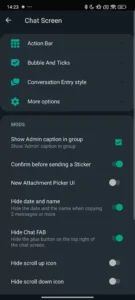
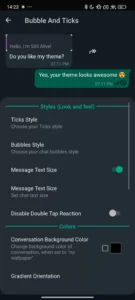
GBWhatsApp 2025 includes an upgraded theme manager that allows you to download, install, and switch between community-made themes. This includes custom animations for swipe gestures and app navigation, a redesigned home screen experience, and a fully customizable widget for your Android home screen.
Productivity Tools
The latest version retains and improves several productivity-focused features, including:
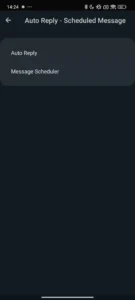
- Message scheduling: Set a specific date and time for a message to be sent automatically
- Auto-reply: Configure automatic responses when you’re unavailable
- Mass messaging: Send a message to multiple contacts at once
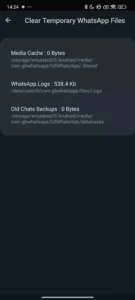
- Temp file cleaner: Delete cached and temporary files directly within the app
GBStickers Add-On
GBWhatsApp includes an add-ons section, and the primary recommended add-on is GBStickers, which gives you access to a vast library of third-party sticker packs you can use in your chats.
Key Features of GBWhatsApp
GBWhatsApp is packed with features. Here’s a consolidated look at the most important ones:
Messaging and Communication
- Send messages to unsaved numbers without adding them to your contacts
- Schedule messages to be sent at a future date and time
- Set up auto-replies for when you’re busy or offline
- Send bulk messages to multiple contacts simultaneously
- Increased media sharing limits — send larger video files and higher-resolution images than the official app allows
Interface and Usability
- Dark mode toggle accessible from the main chat list
- Quick-access profile shortcut in the top bar
- Custom animations for app gestures and transitions
- Redesigned home screen with additional layout options
- Customizable widget for your Android launcher
Backup and Data Management
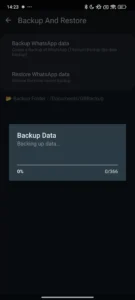
- Local backup tool that saves your chat history to internal storage
- Full app backup powered by a Titanium Backup-style tool
- Delete temporary files directly from within the app
- Backup restoration even after reinstallation
Add-Ons and Extras
- GBStickers: A massive sticker library add-on
- Theme store with community-uploaded themes
- Icon customization to change the app icon on your home screen
Privacy and Security Features
One of the biggest reasons users flock to GBWhatsApp is its unmatched privacy toolkit. These features go far beyond what Meta has implemented in the official app.
Hide Your Online Status
GBWhatsApp allows you to completely freeze your “last seen” timestamp. Even if you’re actively using the app, your contacts will see either no last-seen information or a frozen timestamp from a previous session.
Disable Read Receipts Selectively
While the official WhatsApp lets you turn off blue ticks entirely, GBWhatsApp gives you more granular control. You can hide the second gray tick (delivery receipt) and the blue double ticks (read receipt) independently.
Hide the “Typing…” Indicator
When composing a message in the official WhatsApp, your contact can see that you’re typing. GBWhatsApp lets you disable this indicator entirely, so your contacts never know when you’re in the middle of writing a response.
Hide Voice Message Recording Status
Similarly, when you record a voice message in the official app, the recipient can see you’re recording. GBWhatsApp allows you to hide this status too.
Ghost Mode (Complete Invisibility)
As described earlier, Ghost Mode bundles multiple privacy settings into a single toggle, making you essentially invisible on WhatsApp without logging out.
View Statuses Anonymously
You can view contacts’ status updates without them appearing in the viewer list. This is a feature many users have wished for in the official app for years.
Block Incoming Calls
GBWhatsApp gives you the option to block all incoming calls — a feature not available in the standard app. You can set this for all contacts or specific ones.
App Lock
You can lock GBWhatsApp itself with a PIN, password, or fingerprint, adding an additional layer of protection beyond your phone’s own lock screen.
Prevent Message Deletion
In the official WhatsApp, a sender can delete a message for everyone — and you’ll only see “This message was deleted.” GBWhatsApp can prevent this, allowing you to retain messages even after the sender has attempted to delete them.
Anti-Revoke Messages
Related to the above, the anti-revoke feature preserves all incoming messages regardless of what the sender does after sending them.
Customization Features
If privacy is one pillar of GBWhatsApp’s appeal, customization is the other. The app offers an unprecedented level of visual personalization.
Themes
GBWhatsApp includes a built-in theme store with hundreds of community-made themes. These themes can completely transform the look of the app — from color palettes to font styles, icon shapes, and background patterns. The official WhatsApp offers essentially zero theme support beyond chat wallpapers.
Color Scheme Customization
Beyond themes, you can manually adjust the app’s color scheme. Change the color of the top bar, chat bubbles, message text, icons, and more.
Font Customization
Switch between different font styles to give the app a unique look that matches your personal taste.
Chat Bubble Styles
Customize the shape and style of chat bubbles in individual conversations. You can choose from rounded, square, or various other styles.
Notification Customization
GBWhatsApp offers detailed control over how notifications appear. Change notification icons, sounds, LED colors, and notification styles for individual contacts or groups.
Icon Modification
Change the app icon that appears on your home screen and app drawer. This is useful if you want to keep your use of a MOD discreet.
Widget Customization
GBWhatsApp includes a fully customizable widget for your Android home screen, allowing you to see recent chats, unread counts, or shortcuts at a glance.
GBWhatsApp vs. Official WhatsApp: Key Differences
Understanding how GBWhatsApp stacks up against the official WhatsApp is essential for making an informed decision. Here’s a detailed comparison:
| Feature | GBWhatsApp | Official WhatsApp |
|---|---|---|
| Theme support | Full theme store | None |
| Ghost mode | Yes | No |
| Message scheduling | Yes | No |
| Auto-reply | Yes | Business only |
| Mass messaging | Yes | No |
| Hide blue ticks | Yes (granular) | Yes (all-or-nothing) |
| Hide typing indicator | Yes | No |
| Anonymous status viewing | Yes | No |
| Prevent message deletion | Yes | No |
| App lock | Yes | No |
| Dual account support | Yes | Limited |
| Cloud backup | No | Yes (Google Drive) |
| Local backup | Yes (comprehensive) | Limited |
| Official Meta support | No | Yes |
| Google Play availability | No | Yes |
| File size limit (video) | Higher | Lower |
| Anti-ban protection | Claimed | N/A |
The differences are considerable. For users who prioritize privacy, customization, and productivity features, GBWhatsApp’s advantages are hard to ignore. For users who prioritize security, official support, and platform integrity, the official WhatsApp remains the safer choice.
GBWhatsApp vs. WhatsApp Plus
GBWhatsApp and WhatsApp Plus are two of the most popular WhatsApp MODs available, and they are frequently compared. Both are highly similar in function, but there are some notable differences worth understanding.
Interface
Both apps use the same underlying WhatsApp codebase, so their interfaces are virtually identical at a surface level. The same chat list layout, the same icons in the top bar, the same navigation structure — they look almost the same.
Themes
Both apps support theme installation, but they draw from different theme repositories. The selections available in GBWhatsApp differ from those in WhatsApp Plus, so users may prefer one library over the other.
Unique Features
WhatsApp Plus includes a small number of features not found in GBWhatsApp — for example, the ability to change the forwarding label that appears when you forward a message. Conversely, GBWhatsApp has some exclusive tools that WhatsApp Plus doesn’t include.
Developer and Update Frequency
GBWhatsApp and WhatsApp Plus are maintained by different developer teams. This affects how quickly each app receives updates following a new official WhatsApp release.
Community and Support
GBWhatsApp generally has a larger global community and more widely available support resources compared to WhatsApp Plus.
Verdict
If you’re choosing between the two, the decision often comes down to personal preference — specifically which theme library you prefer and which small feature differences matter most to you. Most users who try both apps end up settling on whichever one they tried first, as the overall experience is remarkably similar.
How to Download GBWhatsApp APK (2025)
Since GBWhatsApp is not available on the Google Play Store, you’ll need to download the APK file manually from a trusted third-party source. Here’s what you need to know:
Where to Download
Always download GBWhatsApp from a reputable source that checks files for malware before making them available. Trusted tech download sites that vet their APK files are your best option. Avoid random blogs, ad-heavy sites, or pages with suspicious download buttons.
Steps to Download
- Open your browser on your Android device
- Navigate to your chosen trusted download source
- Find the GBWhatsApp 2025 download page
- Tap the download button — this will begin downloading the GBWhatsApp APK file
- The file will be saved to your device’s Downloads folder
Enable Unknown Sources
Before you can install the APK, you’ll need to allow your Android device to install apps from sources outside the Play Store:
- On Android 8.0 and above: Go to Settings > Apps > Special App Access > Install Unknown Apps, then select your browser and toggle “Allow from this source” to ON
- On older Android versions: Go to Settings > Security and toggle “Unknown Sources” to ON
File Size and Requirements
- Minimum Android version required: Android 4.0.3 or higher
- The APK file size is typically in the range of 50–60MB, depending on the version
How to Install GBWhatsApp on Android
Once you’ve downloaded the GBWhatsApp APK, installation is straightforward:
Step-by-Step Installation Guide
Step 1: Locate the downloaded APK file. You can find it in your Downloads folder using any file manager app, or tap the download notification in your notification bar.
Step 2: Tap on the APK file to begin the installation process. Your phone may display a warning about installing apps from unknown sources — this is expected for any APK file not downloaded from the Play Store.
Step 3: A pop-up window will appear asking if you want to install the application. Review the permissions it requests, then tap Install.
Step 4: Wait for the installation to complete. This typically takes less than a minute.
Step 5: Once installation is finished, tap Open to launch GBWhatsApp for the first time.
Step 6: Follow the on-screen setup wizard to configure your account (detailed in the next section).
Important Notes Before Installing
- If you already have the official WhatsApp installed on your device, GBWhatsApp can be installed alongside it. The two apps use different package names and won’t conflict with each other.
- However, you cannot be logged into the same phone number on both apps simultaneously. GBWhatsApp is best used with a secondary phone number, or as a full replacement for the official app.
- Back up your existing WhatsApp chats before switching to avoid data loss.
How to Set Up Your GBWhatsApp Account
Setting up GBWhatsApp for the first time is nearly identical to the setup process for official WhatsApp:
Setup Steps
- Choose your language: Select your preferred language from the list presented.
- Accept the Terms of Service: Read and accept the terms and conditions to proceed.
- Enter your phone number: Input your phone number including the country code. GBWhatsApp will send a verification SMS to this number.
- Enter the verification code: Once you receive the SMS, enter the 6-digit code in the app. If you’re migrating from the official WhatsApp and have a backup, you may also be able to verify via a WhatsApp call.
- Set up your profile: Enter your name and optionally upload a profile photo.
- Restore your backup (if applicable): If you have a local backup from a previous installation of GBWhatsApp or official WhatsApp, the app will prompt you to restore it.
- Start messaging: Once setup is complete, GBWhatsApp will sync your contacts and you’re ready to go.
Exploring GB-Specific Settings
Once you’re logged in, explore the settings menu to find the dedicated GBConfigurations section. This is where all the exclusive GBWhatsApp features live, including ghost mode settings, theme manager, privacy options, and more.
How to Transfer Chats from WhatsApp to GBWhatsApp
Transferring your existing WhatsApp chat history to GBWhatsApp requires some manual steps, since the apps use different storage directories.
Local Backup Method
This method works if you have a local backup of your WhatsApp chats stored on your device:
- In the official WhatsApp, go to Settings > Chats > Chat Backup and create a local backup
- Open your phone’s file manager
- Navigate to the WhatsApp backup folder:
Android/media/com.whatsapp/WhatsApp/Backups - Copy the backup files
- Navigate to the GBWhatsApp backup folder:
Android/media/com.gbwhatsapp/GBWhatsApp/Backups - Paste the copied backup files into this directory
- Open GBWhatsApp and follow the prompts to restore from backup
Important Limitation
The official WhatsApp’s cloud backup system (Google Drive) is not accessible by GBWhatsApp or any other third-party MOD. This is a deliberate restriction by Google and Meta, and it means you cannot restore a Google Drive backup to GBWhatsApp. Only local device backups can be transferred.
How to Back Up and Restore GBWhatsApp Messages
GBWhatsApp includes its own robust backup system that is independent of Google Drive.
Where GBWhatsApp Stores Backups
Your GBWhatsApp backup files are stored in the following directory on your device’s internal storage:
Android > media > com.gbwhatsapp > Backups
Creating a Backup
GBWhatsApp offers two types of backups:
Standard Chat Backup: Go to GBConfigurations > Chats > Chat Backup to create a timestamped backup of your chat history. This saves message data, media references, and contact information.
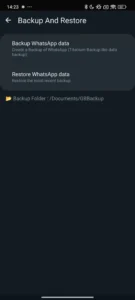
Full App Backup (Titanium-style): Navigate to GBConfigurations > Backup and Restore. Here, you can create a comprehensive backup of the entire application — including your settings, theme choices, customizations, and all chat data. This is extremely useful if you’re switching phones or reinstalling the app.
Restoring a Backup
If you reinstall GBWhatsApp without deleting the backup directory, the app will automatically detect the existing backup during setup and offer to restore it. You can also manually restore from the Backup and Restore menu in GBConfigurations.
Recovering Deleted Messages
If you accidentally deleted a message thread, you may be able to recover it from a recent backup. Go to GBConfigurations > Backup and Restore and look for a backup that predates the deletion. Keep in mind that any messages received between the backup date and the current date will be lost upon restoration.
How to Update GBWhatsApp
Keeping GBWhatsApp updated is important for both security and compatibility. Since the app isn’t on the Play Store, updates don’t happen automatically — you need to manage them yourself.
Method 1: Manual Download from a Trusted Source
The most reliable way to update GBWhatsApp is to:
- Bookmark the trusted download page where you originally got GBWhatsApp
- Periodically check the page to see if a new version has been released
- Download the new APK and install it on top of your existing installation (your chats and data will be preserved)
Method 2: In-App Update Check
GBWhatsApp includes a built-in update checker. Go to GBConfigurations > Updates and tap Check for Updates. If a new version is available on the MOD’s own servers, you’ll be prompted to download and install it.
Important caveat: The in-app update checker sometimes lags behind the latest available version. Always cross-reference with a trusted external source to confirm you’re on the most current build.
Why Updating Matters
WhatsApp frequently pushes updates that include security patches and protocol changes. If GBWhatsApp falls significantly behind the official version, there’s a risk that your account may be flagged or that connectivity issues arise. Staying updated minimizes these risks.
Is GBWhatsApp Safe? Risks and Considerations
This is the most important question for anyone considering GBWhatsApp, and it deserves a thorough and honest answer. The safety question has several dimensions:
Virus and Malware Safety
When downloaded from a reputable source that scans APK files before distribution, GBWhatsApp is generally considered free of viruses and malware. Trusted APK sites typically run every file through antivirus checks before publishing it.
However, there is an important caveat: we cannot audit the source code. GBWhatsApp is not open-source in the traditional sense, and the developers behind it are anonymous independent parties. While no known instances of malicious data collection have been definitively proven, it is theoretically possible that the app includes code to log user activity, collect contact lists, or transmit data to unknown servers. This cannot be ruled out with certainty.
Account Security
Your WhatsApp account credentials are stored within GBWhatsApp. Since the app is not developed by Meta, there is an inherent risk that your account information could be mishandled. That said, millions of users have used GBWhatsApp for years without reported large-scale account compromises.
Terms of Service Violation
This is the clearest and most concrete risk: using GBWhatsApp directly violates WhatsApp’s Terms of Service. The ToS explicitly requires that users only connect through the official WhatsApp client. Meta actively monitors for third-party app usage and can take action against accounts detected to be using MODs.
Privacy of Your Conversations
Your messages in GBWhatsApp are not end-to-end encrypted in the same way they are in the official app — or more precisely, the encryption implementation cannot be verified by independent auditors. If privacy of message content is your top concern, this is a significant consideration.
Can You Get Banned for Using GBWhatsApp?
Yes — and this is a risk that every GBWhatsApp user must accept before installing the app.
Types of Bans
Temporary Ban: The most common outcome when WhatsApp detects MOD usage is a temporary suspension. Typically, this lasts between a few hours and 72 hours. During this period, you’ll receive a message saying your account has been temporarily banned. In many cases, you can lift the ban by reinstalling the official WhatsApp and logging in normally.
Permanent Ban: In more severe cases, particularly for repeat offenders or users detected using older, less sophisticated MOD versions, WhatsApp may permanently ban the account. This means losing your phone number’s WhatsApp access entirely — including all your contacts, groups, and chat history.
Anti-Ban Features
GBWhatsApp includes what it calls Anti-Ban protection. This is a set of measures the MOD developers implement to make the modified app look as close to the official app as possible from a server-side perspective, reducing the likelihood of detection. However, this protection is never 100% guaranteed.
How to Recover a Banned Account
If you receive a temporary ban:
- Uninstall GBWhatsApp
- Install the official WhatsApp
- Log in with the same phone number
- If the ban was temporary, access should be restored within 24–72 hours
If the ban is permanent:
- Contact WhatsApp support at [email protected] or through the Help Center
- Explain your situation and request account restoration
- Be aware that WhatsApp is not obligated to restore a permanently banned account
Why Is GBWhatsApp Not Working? Common Fixes
Like any application, GBWhatsApp can run into problems. Here are the most common issues and how to fix them:
Problem 1: App Won’t Open or Crashes Immediately
Possible Causes: Compatibility issue with your Android version, corrupted APK, or conflict with another app.
Fix: Clear the app’s cache and data (Settings > Apps > GBWhatsApp > Storage > Clear Cache). If the problem persists, uninstall and reinstall using a fresh APK download.
Problem 2: Can’t Verify Phone Number
Possible Causes: Network issue, incorrect number format, or temporary block by WhatsApp servers.
Fix: Ensure you have a stable internet connection. Try requesting verification via phone call instead of SMS. Check that you’ve entered the country code correctly.
Problem 3: Banned or Logged Out Unexpectedly
Possible Causes: WhatsApp detected the MOD and suspended the account.
Fix: Install the official WhatsApp and log in to attempt account recovery. Wait 24–72 hours if access is not immediately restored.
Problem 4: Settings Change Broke the App
Possible Causes: A specific GBWhatsApp setting or customization has caused a conflict.
Fix: Go to Settings > Apps > GBWhatsApp > Storage > Clear Data. Note this will log you out of the app, so ensure you have a backup of your chats first.
Problem 5: Media Not Loading
Possible Causes: Storage permission not granted, full storage, or download settings.
Fix: Check that GBWhatsApp has storage permissions (Settings > Apps > GBWhatsApp > Permissions). Free up storage space on your device if necessary.
Problem 6: Notification Not Working
Possible Causes: Battery optimization settings, notification permissions, or background app restrictions.
Fix: Go to Settings > Battery > Battery Optimization and exclude GBWhatsApp. Also check Settings > Apps > GBWhatsApp > Notifications and ensure all notification categories are enabled.
GBWhatsApp Pro: What Is It and How Is It Different?
GBWhatsApp Pro is a separate MOD that, despite the similar name, is a distinct application from GBWhatsApp. It is developed by a different team and has its own feature set.
Key Differences
- GBWhatsApp Pro often includes a slightly different selection of privacy tools
- The theme libraries differ between the two apps
- Update cycles for GBWhatsApp Pro may vary from those of GBWhatsApp
- Some users report a different level of anti-ban protection between the two versions
How to Get GBWhatsApp Pro
GBWhatsApp Pro is available as a separate APK download from trusted third-party sources. The installation process is identical to that of GBWhatsApp — download the APK, enable unknown sources, and install manually.
Should You Use GBWhatsApp or GBWhatsApp Pro?
For most users, the differences are minor enough that either app will serve you well. The “Pro” branding doesn’t necessarily mean a superior product — it simply denotes a different fork of the MOD. Try both if you’re undecided and settle on whichever feels more polished and up-to-date.
Best Alternatives to GBWhatsApp
If GBWhatsApp doesn’t quite meet your needs, or if you’d like to explore what else is out there, here are the best WhatsApp MOD alternatives available:
1. WhatsApp Plus
Perhaps the closest competitor to GBWhatsApp, WhatsApp Plus offers a near-identical feature set with some minor differences in themes and exclusive features. It has a large and loyal user base.
2. YOWhatsApp (YoWA)
YOWhatsApp is developed by a well-regarded developer in the MOD community. It is known for its cleaner interface, strong privacy features, and frequent updates. Many users consider it more polished than GBWhatsApp.
3. FMWhatsApp
Developed by Fouad Mokdad, FMWhatsApp (and the related Fouad WhatsApp) is praised for its stability and the developer’s reputation for fast updates following official WhatsApp releases.
4. JTWhatsApp
JTWhatsApp is a lesser-known but solid alternative that offers many of the same core features as GBWhatsApp, with a slightly different take on customization.
5. WhatsApp Aero
WhatsApp Aero distinguishes itself with a visually distinct default theme and design language compared to other MODs. It’s popular among users who want a fresh look right out of the box.
6. MBWhatsApp
MBWhatsApp is another reliable MOD that offers the standard slate of privacy and customization features with a different user community and developer team.
7. Fouad iOS WhatsApp
This unique MOD takes a different approach: it gives Android users an interface that mimics the iOS version of WhatsApp, complete with iPhone-style design elements. It’s popular among Android users who prefer the aesthetic of the Apple version of the app.
Comparison Summary
| MOD | Best For | Update Speed | Unique Feature |
|---|---|---|---|
| GBWhatsApp | All-around | Fast | Ghost mode |
| WhatsApp Plus | Themes | Fast | Forwarding label change |
| YOWhatsApp | Privacy | Fast | Clean UI |
| FMWhatsApp | Stability | Very fast | Developer reliability |
| WhatsApp Aero | Design | Moderate | Unique default theme |
| Fouad iOS WA | iOS aesthetic | Fast | iOS-style interface |
Frequently Asked Questions
Is GBWhatsApp free?
Yes, GBWhatsApp is completely free to download and use. There are no paid tiers, subscriptions, or in-app purchases.
Can I use GBWhatsApp on iPhone (iOS)?
No. GBWhatsApp is an Android-only application. iOS does not allow sideloading apps outside of the App Store without a jailbreak, making MODs like GBWhatsApp unavailable on Apple devices.
Can I use GBWhatsApp and official WhatsApp at the same time?
Yes. Because GBWhatsApp uses a different package name (com.gbwhatsapp vs. com.whatsapp), both apps can be installed simultaneously. However, each app must be logged into a different phone number.
Does GBWhatsApp support video calls?
Yes, GBWhatsApp supports both voice and video calls, just like the official WhatsApp.
Can the other person tell I’m using GBWhatsApp?
From a messaging perspective, no — your messages appear identical to those sent from the official app. However, with Ghost Mode enabled and read receipts disabled, they may notice behavioral differences.
Is GBWhatsApp available for PC?
GBWhatsApp is an Android app and does not have a native desktop version. You can, however, run it on a PC using an Android emulator such as BlueStacks or LDPlayer.
What happens to my chats if I get banned?
Your chat data stored locally on your device remains intact even if your account is banned. You won’t lose your message history — you simply won’t be able to send or receive new messages until the ban is lifted.
How often should I update GBWhatsApp?
You should update GBWhatsApp whenever a new version is available. Staying on an outdated version increases the risk of compatibility issues and ban detection.
Can I use GBWhatsApp without a phone number?
No. Like the official WhatsApp, GBWhatsApp requires a valid phone number for verification. It does not support email-based or anonymous sign-ups.
Is there a web version of GBWhatsApp?
No. GBWhatsApp does not have a WhatsApp Web equivalent. The standard WhatsApp Web portal (web.whatsapp.com) is designed for the official app and does not work with GBWhatsApp.
Final Verdict: Should You Use GBWhatsApp ?
GBWhatsApp is an impressive piece of software. The sheer breadth of features it packs on top of WhatsApp’s already solid foundation is remarkable — and for many users, those features genuinely improve their daily messaging experience. Ghost mode, message scheduling, advanced privacy controls, full theme support, anti-revoke messages — these are real, useful features that millions of people benefit from.
But the risks are equally real, and they should not be minimized.
You should consider GBWhatsApp if:
- You want deep privacy controls that the official app doesn’t offer
- Customization and personalization are important to you
- You use a secondary phone number or SIM that you’re willing to risk
- You’re comfortable with the security trade-offs of using a non-official app
- You need productivity features like message scheduling or auto-reply without a Business account
You should stick with official WhatsApp if:
- Your WhatsApp account is critically important to you (e.g., it’s your primary business contact number)
- Privacy and data security are paramount — you want verified end-to-end encryption
- You rely on Google Drive backup and don’t want to risk losing your chat history
- You’re not comfortable with the possibility of an account ban
The bottom line: GBWhatsApp is best treated as a power-user tool for those who understand its risks. If you’re willing to accept the possibility of a temporary ban and the uncertainty around source code transparency, the feature set is genuinely impressive and largely delivers on its promises.
If you decide to give it a try, download only from trusted, malware-verified sources, keep the app updated, and always maintain a local backup of your important chats. Used thoughtfully, GBWhatsApp can transform your WhatsApp experience in ways the official app simply cannot match.
Download links
An ad will pop up before the download. Close it, click download again—ads keep us going, thanks!


