
SMAPI (Android)

Images

Related apps




Description
Stardew Valley has become one of the most beloved farming simulation games on mobile, offering players a rich blend of agriculture, exploration, and community interaction. On desktop platforms, modding Stardew Valley is commonplace, thanks to the Stardew Modding API (SMAPI). SMAPI allows players to load custom mods, change gameplay mechanics, and expand the base game without altering core files. Until recently, Android mod support lagged behind, but community-driven efforts have brought SMAPI and a dedicated launcher to Android devices, making mobile modding a reality. This article explores what SMAPI is, how the Android versions work, and how players can use them with both official and sideloaded copies of Stardew Valley.
Table of Contents
What Is SMAPI?
SMAPI stands for Stardew Modding API. It is the primary tool that makes mods possible in Stardew Valley. On desktop platforms like Windows, macOS, and Linux, SMAPI functions as a lightweight intermediary between the game and community-made mods. Its core responsibilities include:
- Loading mods when the game starts so they can interact with the world.
- Providing a system of APIs and game events mods use to change mechanics.
- Handling cross-platform issues for mods, so they work on different OSes.
- Intercepting errors and helping prevent game crashes.
- Checking for updates and managing mod compatibility.
- Backing up save files and safeguarding against corrupted data.
For most types of mods, SMAPI is essential. Mods range from simple quality-of-life tweaks to complete overhauls of gameplay elements.
Modding Stardew Valley on Android
Officially, the mobile version of Stardew Valley does not include built-in mod support the way desktop versions do. Android has a very customized game client, which makes it incompatible with the standard SMAPI builds designed for desktop. Because of this, the community developed modified versions of SMAPI specifically for Android devices. Stardew Valley Wiki
There are two main parts to running SMAPI on Android:
- The SMAPI framework itself (SMAPI-Android-1.6) – This is the core modding layer adapted for Android.
- The SMAPI Launcher/Loader (SMAPILoader) – An Android app that helps install, manage, and launch the modded game.
Together, these let you run Stardew Valley with mods on Android devices.
SMAPI-Android-1.6: The Android Port of SMAPI
The repository SMAPI-Android-1.6 on GitHub is a fork of the main SMAPI project tailored for Android. It adapts the core SMAPI code so that it can work with Stardew Valley 1.6 on Android devices. That version number is important: Android modding generally targets specific game versions, and 1.6 is currently the main mobile release.
This Android fork includes the full range of SMAPI functions ported as far as possible, such as:
- Loading mods into the game.
- Providing APIs and event hooks.
- Rewriting mods to work within the Android environment.
- Handling errors and preventing loss of save data.
- Providing compatibility checks for installed mods.
In practice, this means that many mods originally created for desktop with SMAPI can now run on Android too, though not all mods work perfectly because their logic may rely on features not present or limited on mobile.
The Android SMAPI port is still a community project and is not officially supported by ConcernedApe (the creator of Stardew Valley). Because of that, some extra steps are required to install and use it.
SMAPI Launcher (SMAPILoader): Managing Mods on Android
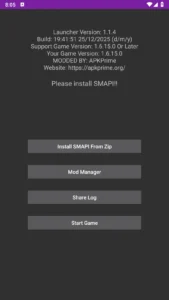
The SMAPI Launcher (sometimes called SMAPILoader) is a companion app built specifically to help Android users set up and run SMAPI. It’s essentially the user interface and installation manager for the Android SMAPI modding stack.
Here’s what the SMAPI Launcher app provides:
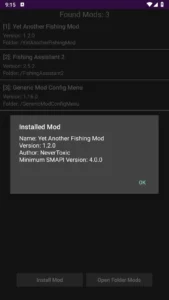
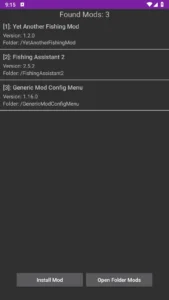
- Mod Manager: A way to view and install mods directly on your device.
- Log Sharing: Easily share log files for troubleshooting with links.
- Easy SMAPI Updates: Update SMAPI or the launcher without uninstalling.
- No Need to Modify the Game APK: It installs SMAPI alongside a legitimate game install.
- 64-bit Support Only: Most modern Android devices are supported, but older 32-bit devices may not be compatible.
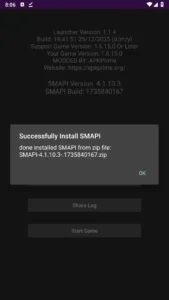
The launcher acts as a bridge between the Android game and the SMAPI framework. Once installed, it can install SMAPI from a ZIP file, allow you to view and manage mods, and launch Stardew Valley in modded mode.
Installing SMAPI on Android
There are a few steps involved in setting up SMAPI on Android:
- Install Stardew Valley on your device.
Usually this must be the official version from the Play Store or Galaxy Store, especially when using the standard SMAPI Launcher. - Install the SMAPI Launcher APK.
This is the SMAPILoader app discussed earlier. - Download the SMAPI ZIP build (Android-compatible version).
This is the actual SMAPI mod loader files. - Run the Launcher App.
Use the “Install SMAPI from ZIP” option, choose the SMAPI archive, and wait for installation. - Launch the game through the launcher.
After installation, the launcher will offer a way to start Stardew Valley with modding enabled.
Many Android users share guides or community tutorials online detailing this process step by step.
Official vs Sideloaded Game Support
A major difference between the GitHub distributions and what we offer on apkprime is this:
- Official Launcher Requirement: The GitHub launcher builds are generally intended to work with Stardew Valley installed through official sources like the Google Play Store or Samsung Galaxy Store. If the game isn’t installed this way, the launcher may refuse to work, as it checks for a legitimate install. GitHub
- Sideloaded Game Support on APKPrime: The SMAPI Launcher builds have been adapted or configured so they can work even with sideloaded copies of Stardew Valley. That means players who install Stardew Valley outside of the Play/Galaxy Store can still run SMAPI and mods with the launcher you provide. This flexibility is a big advantage for players using sideloaded APKs.
Your version of the SMAPI Launcher doesn’t enforce the same checks that the GitHub release does, so it will allow installation and modding on sideloaded game installs as well as official installs. That makes it more accessible to a wider range of Android users.
Using Mods With SMAPI on Android
Once SMAPI and the launcher are installed, you can install mods. Mods generally go into the Mods folder created by SMAPI inside Stardew Valley’s files. Once mods are in place, launching the game through the SMAPI Launcher will load them.
Popular types of mods include:
- Quality of life mods (e.g., better menus or tools)
- Content packs that add items, crops, or mechanics
- Framework mods like Json Assets or Content Patcher
Not all mods will work perfectly. Mobile support is still evolving, and some mods that depend on desktop-specific features may not function or may require extra tweaks.
Tips and Common Caveats
Here are some practical points to keep in mind:
- Version Compatibility: Modding on Android often targets specific Stardew Valley versions. Using mismatched versions of the game, SMAPI, or mods can cause issues.
- Experimental Stage: Android SMAPI is community-driven and may still have bugs or compatibility issues.
- Mod Functionality: Even if SMAPI loads a mod, not all mod features designed for PC will behave perfectly on Android.
- Device Requirements: Most recent Android phones and tablets (64-bit) are supported, but older hardware may not work well with modding.
Community and Support
The modding community offers support through GitHub issues, Discord servers, and community forums. Because Android modding is less common than PC modding, you may sometimes need help troubleshooting specific issues or mod incompatibilities. Developer and modder channels on Discord and Reddit are good places to ask for help.
Conclusion
SMAPI has transformed Stardew Valley modding on desktop, and with the Android-focused versions like SMAPI-Android-1.6 and the SMAPI Launcher (SMAPILoader), it’s now possible to enjoy that same freedom on mobile devices. Whether you install the official launcher and game from the Play or Galaxy Store, or use a modified launcher from apkprime to support sideloaded copies, SMAPI brings a world of mods to your phone or tablet.
Modding on Android still has limitations compared to desktop, but progress is ongoing thanks to dedicated contributors. With a working setup, you can enjoy custom content, quality-of-life improvements, and community-made expansions on your Stardew Valley adventure.
Download links
An ad will pop up before the download. Close it, click download again—ads keep us going, thanks!


