
LuluBox
Gokoo Technology Pte. Ltd.
May 04, 2026
15.3 MB
6.2.2
Android

Images
Related apps




Description
LuluBox is one of the most popular Android gaming utility apps in the world, trusted by over 5 million users globally. Developed by Gokoo Technology Pte. Ltd., LuluBox is not a game — it is a powerful plugin manager and game enhancement platform that modifies how your favorite mobile games behave on your Android device.
Table of Contents
Think of LuluBox as a backstage pass to your game library. While most mobile games lock premium content – including skins, coins, diamonds, outfits, and themes — behind paywalls or time-consuming grind, LuluBox gives you direct access to those features without spending a single rupee or dollar.
What makes LuluBox stand apart from other game-modifying tools is its non-root approach. You do not need to root your Android device to use LuluBox. This means your phone’s warranty stays intact, your security settings remain unchanged, and you can start enhancing your games within minutes of installation.
LuluBox is not available on the Google Play Store because of its nature as a third-party APK tool, but it is widely used and downloaded safely from trusted sources across the internet. The app is especially popular in countries like India, Indonesia, Brazil, and the Philippines — regions with a booming mobile gaming culture where players want the best gaming experience without high in-app purchase costs.
Whether you play PUBG Mobile, Free Fire, Mobile Legends, 8 Ball Pool, Subway Surfers, or Carrom Pool, LuluBox has specific plugins designed to enhance your experience in each of these titles.
LuluBox vs LuluBox Pro — Key Differences
Many users are confused about the difference between the standard LuluBox and LuluBox Pro. Here is a clear breakdown:
| Feature | LuluBox (Free) | LuluBox Pro |
|---|---|---|
| Skin Unlocking | Limited | All Premium Skins |
| Ad-Free Experience | No | Yes |
| Game Booster | Basic | Advanced |
| Graphics Customization | Standard | HD & Advanced |
| DND Mode | Yes | Yes |
| App Cloning | Yes | Yes |
| Supported Games | 30+ | 50+ |
| Anti-Ban Protection | Basic | Enhanced |
| Updates | Regular | Priority |
| Plugin Support | Basic | Advanced + Custom |
LuluBox (Standard Version)
The standard version of LuluBox is completely free and offers access to a solid set of gaming plugins. It supports popular titles and lets you unlock game skins, manage plugins, and boost performance. However, it may display ads and has limited access to some advanced graphic customization tools.
LuluBox Pro
LuluBox Pro is the premium, upgraded version of the app. It is designed for serious and competitive mobile gamers. LuluBox Pro delivers a fully ad-free experience, supports more games, and provides access to advanced graphic enhancement tools. The anti-ban protection in LuluBox Pro is also more robust, making it safer for use in online multiplayer environments.
LuluBox Pro APK is also a free download — no subscription is required. It is the go-to choice for players who want the full LuluBox experience without any limitations.
Top Features of LuluBox
LuluBox has built its massive user base on the strength of a rich and constantly expanding feature set. Here is a deep look at everything the app offers:
1. Unlock Premium Skins for Free
One of the most exciting features of LuluBox is its ability to unlock official game skins at zero cost. In games like Free Fire, PUBG Mobile, and Mobile Legends, rare and premium skins typically require spending real money. LuluBox bypasses this by patching the game client locally on your device, giving you instant access to all available skin packs without any purchases.
This includes character outfits, weapon skins, vehicle wraps, parachute designs, and more — all the cosmetic upgrades that make your in-game avatar stand out.
2. Unlimited Coins, Diamonds, and In-Game Currency
LuluBox provides access to unlimited in-game currencies in supported titles. This includes:
- Coins in 8 Ball Pool and Carrom Pool
- Diamonds in Free Fire
- Gold and Gems in Mobile Legends
- Lives and Boosters in Candy Crush
- UC (Unknown Cash) in PUBG Mobile
No more grinding for hours or spending money on microtransactions. LuluBox gives you a full wallet right from the start.
3. Game Booster — Eliminate Lag and FPS Drops
LuluBox features a built-in Game Booster that optimizes your device’s CPU and GPU resources in real time. When activated for a specific game, the booster closes background apps automatically, frees up RAM, and ensures that frame rates remain stable throughout your session.
Users with mid-range Android phones — especially those running on 4GB to 6GB of RAM — report a performance improvement of 25 to 40% after enabling LuluBox’s Game Turbo feature. This is a massive benefit in fast-paced games like Free Fire and Mobile Legends, where lag can cost you a match.
4. Ad Blocker for Games
Tired of intrusive ads interrupting your gameplay? LuluBox’s in-game ad blocker removes these advertisements entirely, giving you a smooth and uninterrupted experience. This feature is particularly useful in casual games like Candy Crush, Subway Surfers, and Hill Climb Racing, where ads are frequent and disruptive.
The ad blocker also helps conserve your mobile data and battery — a double benefit for users on limited data plans.
5. DND (Do Not Disturb) Mode
LuluBox includes a powerful Do Not Disturb mode that silences all incoming calls, messages, and notifications while you are in-game. This is a blessing for competitive players in ranked matches or those deep in story-mode sessions where interruptions can ruin the experience.
DND mode is available in both the free and Pro versions and can be toggled on or off with a single tap from within the app.
6. Plugin Manager
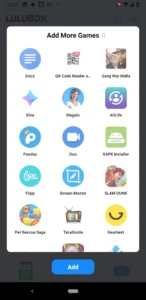
LuluBox functions primarily as a plugin management system. Each supported game has its own dedicated plugin that you can install, update, or remove independently. This modular design means you only download what you need, keeping the app lightweight and your storage clean.
The plugin manager also supports custom plugins, meaning advanced users can add extra functions and mods to games they want to customize beyond the default offerings.
7. App Cloning
Beyond gaming, LuluBox also works as an app cloning tool. It can duplicate any app or game on your device, allowing you to run multiple accounts simultaneously. This is useful for gamers who manage separate accounts for ranked and casual play, or for users who want two social media accounts on one phone.
8. Graphics and Visual Customization
LuluBox Super and LuluBox Pro include advanced graphics customization tools that let you tweak visual settings in supported games. You can enhance textures, adjust resolution scaling, and modify environmental settings to get the best possible visuals on your device — or sacrifice graphics for a higher frame rate if performance is your priority.
9. Social Hub and Community
LuluBox includes a built-in social space where gamers can connect with each other, share tips, and stay updated on the latest game news and plugin releases. This community element adds a social layer to the app, making it more than just a utility tool.
10. 64-Bit Architecture Support (LuluBox Pro 64)
The LuluBox Pro 64 variant is a special edition optimized for Android devices running on 64-bit processors. This version delivers faster processing, better compatibility with modern games that require advanced hardware, and smoother overall performance on flagship and mid-range Android phones.
Supported Games in LuluBox
LuluBox supports a wide and growing library of mobile games. The most popular supported titles include:
Battle & Shooter Games:
- PUBG Mobile
- Free Fire / Free Fire MAX
- Call of Duty: Mobile
- Mobile Legends: Bang Bang
- Liên Quân Mobile
Sports & Casual Games:
- 8 Ball Pool
- Carrom Pool
- Mini Militia
- Clash of Clans
- Clash Royale
Endless Runners & Arcade:
- Subway Surfers
- Temple Run 2
- Hill Climb Racing
- Candy Crush Saga
Adventure & Sandbox:
- Minecraft
- Among Us
- Stumble Guys
New game support is regularly added with each update. You can check the “Discover” tab inside the LuluBox app to see what new titles and plugins have been added in the latest version.
How to Download and Install LuluBox APK
Since LuluBox is not available on the Google Play Store, you need to download and install it manually as an APK file. Here is a step-by-step installation guide:
Step 1: Enable Unknown Sources
Before you can install any APK file outside of the Play Store, you need to allow your device to install from unknown sources:
- Go to your phone’s Settings
- Tap on Security or Privacy
- Enable “Install Unknown Apps” or “Unknown Sources”
On Android 8.0 and above, you may need to grant this permission per-app (i.e., to your browser or file manager) rather than as a global toggle.
Step 2: Download the LuluBox APK
Visit a trusted and verified source to download the latest LuluBox APK. Always ensure the site you are downloading from is reputable. Check user reviews, virus scan results, and that the file size matches the official release.
⚠️ Important Warning: Avoid downloading LuluBox from unofficial or random sources. Many fake versions of LuluBox circulate online and may contain malware, adware, or spyware. Always verify the source before downloading.
Step 3: Install the APK
- Open your Downloads folder or file manager
- Tap on the downloaded LuluBox APK file
- Tap “Install” and wait for the process to complete
- Tap “Open” once the installation is finished
Step 4: Launch and Set Up
- Open the LuluBox app
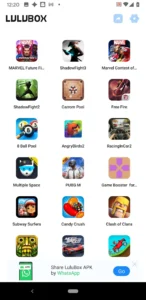
- Browse the list of supported games
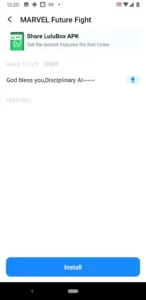
- Select your game and tap on the available plugin(s)
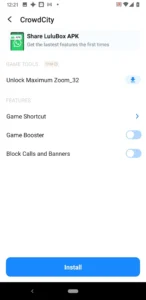
- Activate the desired features (skins, booster, ad blocker, etc.)
- Launch the game directly through LuluBox
The entire installation process typically takes under five minutes, even on a slow internet connection.
How to Use LuluBox — Step-by-Step
Once LuluBox is installed, using it is straightforward:
- Open LuluBox and browse the game library
- Find your game — use the search bar or scroll through categories
- Tap on the game to see available plugins and features
- Select the plugins you want to activate (e.g., skin pack, ad blocker, game booster)
- Tap “Patch” or “Apply” to apply the modifications
- Launch the game directly from within LuluBox using the game icon shown in the app
- Enjoy your enhanced gaming session!
Pro Tips for Best Results:
- Keep LuluBox updated — new plugins and game support are added with every update
- Grant all necessary permissions — some features like screen recording or network acceleration require extra permissions
- Clear cache regularly — this keeps LuluBox running smoothly and frees up memory
- Use with supported game versions — using LuluBox with unauthorized or heavily modded game versions can cause instability
- Avoid using in official ranked tournaments — while LuluBox’s anti-ban system is effective, using modification tools in official esports competitions is against the rules
Is LuluBox Safe?
This is the most common question users ask, and the answer is: Yes — when downloaded from a trusted source, LuluBox is safe to use.
Here is a breakdown of the safety considerations:
Device Safety
LuluBox does not require root access, which means it does not modify your device’s core system files. Your phone’s security settings, warranty, and operating system remain completely untouched. The app only requests access to the list of installed games on your phone — it does not ask for access to your contacts, messages, photos, or banking apps.
LuluBox has been scanned by VirusTotal and other industry-leading security platforms and has passed all checks with no viruses, malware, or spyware detected — provided the file is downloaded from the official or verified source.
Account Safety
LuluBox includes a built-in anti-ban system designed to mask unusual in-game activity and reduce detection risks in online multiplayer games like Free Fire and PUBG Mobile. This system is more advanced in LuluBox Pro.
However, no system is completely flawless. There is always a small risk of account bans when using modification tools in online games, particularly if the app is outdated or misused. To minimize this risk:
- Always use the latest version of LuluBox
- Avoid using it in official tournaments or ranked competitions
- Use it responsibly and in moderation
Legal Considerations
LuluBox is legal to download and install in most countries. However, using it may violate the Terms of Service of individual games. This does not make LuluBox itself illegal, but it means that game developers have the right to ban accounts found using modification tools.
Use LuluBox responsibly and be aware of the rules of any game you are playing.
LuluBox System Requirements
LuluBox is designed to be lightweight and compatible with a wide range of Android devices. Here are the minimum requirements:
| Requirement | Minimum Spec |
|---|---|
| Operating System | Android 5.0 (Lollipop) or higher |
| RAM | 2GB (4GB recommended) |
| Storage | 50MB free space for the app (additional for plugins) |
| Architecture | 32-bit and 64-bit supported |
| Internet | Required for updates and social features |
| Root Required | No |
LuluBox works on most Android smartphones and tablets, from entry-level devices to flagship models. The LuluBox Pro 64 version is specifically optimized for 64-bit devices, offering better performance on modern hardware.
Note: LuluBox is an Android-only application. It is not natively available for iOS (iPhone/iPad). However, it can be used on a Windows PC or Mac via an Android emulator such as BlueStacks or LDPlayer.
LuluBox Alternatives
While LuluBox is the leading choice for Android game enhancement, a few alternatives exist:
1. GameGuardian
GameGuardian is a powerful game hacking tool that allows users to modify in-game values like speed, coins, and HP. However, it requires root access, making it less accessible than LuluBox for most users.
2. Lucky Patcher
Lucky Patcher is a versatile app that can remove ads, bypass in-app purchases, and modify APKs. It is more complex to use than LuluBox and also requires root access for many of its functions.
3. Game Killer
Game Killer is another memory-scanning tool used to modify game values. Like GameGuardian, it typically requires a rooted device.
Why LuluBox Wins:
LuluBox outperforms all of these alternatives for the majority of users because:
- It does not require root access
- It has a clean and beginner-friendly interface
- It offers one-tap plugin management
- It provides a social community
- It is regularly updated with new game support
- It includes a built-in Game Booster and DND mode
For casual and competitive gamers who want powerful features without the complexity of rooting their device, LuluBox is the clear winner.
Common LuluBox Errors and Fixes
Even the best apps encounter occasional issues. Here are the most common LuluBox errors and how to resolve them:
Error 1: “App Not Installed”
Cause: Insufficient storage space, corrupted APK file, or an existing conflicting version of LuluBox. Fix: Clear storage space, delete any previous version of LuluBox, and re-download a fresh APK from a verified source.
Error 2: Game Crashes After Patching
Cause: Plugin version mismatch with the current game update. Fix: Update LuluBox to the latest version. The plugin may not yet be compatible with the most recent game update — wait for a LuluBox plugin update.
Error 3: Skins Not Showing In-Game
Cause: The patch was not applied correctly, or the game was not launched through LuluBox. Fix: Ensure you are opening the game through LuluBox (not from your home screen shortcut). Re-apply the patch and launch again.
Error 4: Game Booster Not Working
Cause: Missing permissions. Fix: Go to LuluBox settings and grant all requested permissions, including “Appear on Top” and “Usage Access.”
Error 5: App Keeps Crashing
Cause: Outdated version or incompatibility with your Android version. Fix: Update LuluBox, clear its cache (Settings > Apps > LuluBox > Clear Cache), and restart the app.
Frequently Asked Questions (FAQ)
Q1: What is LuluBox?
LuluBox is a free Android application developed by Gokoo Technology that acts as a plugin manager and game enhancement platform. It allows users to unlock skins, boost game performance, remove in-game ads, and access premium features in popular mobile games — all without rooting their device.
Q2: Is LuluBox free to download?
Yes, LuluBox is completely free to download and use. LuluBox Pro is also available as a free APK download with no subscription required.
Q3: Does LuluBox require root access?
No. LuluBox works on both rooted and non-rooted Android devices. Root access is not required for any of its core features, which is one of its biggest advantages over similar tools.
Q4: Is LuluBox safe for my Android device?
Yes, LuluBox is safe when downloaded from a trusted and verified source. It has been security-scanned and does not request access to sensitive personal data. However, always download from reputable websites to avoid fake versions that may contain malware.
Q5: Can my account get banned for using LuluBox?
There is always some risk of account bans when using modification tools in online games. LuluBox Pro includes an anti-ban system to reduce this risk, but it is not 100% guaranteed. Avoid using LuluBox during official tournaments or ranked competitions.
Q6: What games does LuluBox support?
LuluBox supports 30–50+ popular games including PUBG Mobile, Free Fire, Mobile Legends, 8 Ball Pool, Carrom Pool, Subway Surfers, Candy Crush, Clash of Clans, Mini Militia, Minecraft, and many more. New game support is added regularly.
Q7: What is the difference between LuluBox and LuluBox Pro?
LuluBox Pro offers additional features including a fully ad-free experience, advanced graphics tools, more game compatibility, enhanced anti-ban protection, and priority updates compared to the standard version.
Q8: Can I use LuluBox on PC or iOS?
LuluBox is an Android-only app. It can be used on a Windows or Mac PC via an Android emulator like BlueStacks or LDPlayer. It is not available for iOS devices.
Q9: How do I update LuluBox?
Since LuluBox is not on the Play Store, you need to download the latest APK file from the official or trusted source and install it over your existing version. The app may also notify you of updates from within the interface.
Q10: What is LuluBox Pro 64?
LuluBox Pro 64 is a specialized version of LuluBox Pro optimized for Android devices running 64-bit architecture. It provides faster processing speed, better compatibility with modern games, and improved overall performance on high-end and mid-range smartphones.
Final Verdict — Is LuluBox Worth It?
Absolutely, LuluBox remains the #1 game enhancement app for Android — and for good reason.
It delivers a rare combination of power, simplicity, and safety. Whether you are a casual gamer looking to remove ads and unlock a few extra skins, or a competitive player who wants to optimize performance and get a gameplay edge, LuluBox has something for you.
Its no-root requirement, massive game library, regular updates, and active user community make it the gold standard in Android game modification tools. With over 5 million users and counting, LuluBox has earned its reputation as a trusted and reliable companion for mobile gamers worldwide.
Download LuluBox today and transform the way you play.
What's new
LuluBox APK v6.2.2
Download links
An ad will pop up before the download. Close it, click download again—ads keep us going, thanks!


