YouTube ReVanced Advanced

Images


Related apps



Description
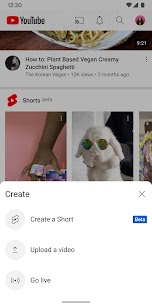
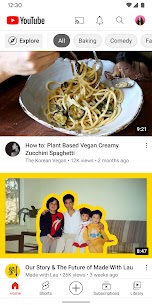
For Android users tired of intrusive ads interrupting every video, the original YouTube Vanced app once felt like a revelation—ad-free playback, background listening, and a host of tweaks that made the official app feel limited. When Vanced shut down in early 2022, many assumed the era of enhanced YouTube clients had ended. Instead, the community rallied around ReVanced, an open-source patching framework that not only revived those features but expanded them dramatically. What some download sites and forums loosely call “YouTube ReVanced Advanced” typically points to either the core ReVanced project or its popular fork, ReVanced Extended (RVX), which adds even more customization options.
Table of Contents
ReVanced stands out because it isn’t a single pre-packaged APK. It’s a modular system built around the ReVanced Manager app, letting users patch the official YouTube APK themselves. This approach keeps the app close to Google’s original code while injecting community-developed enhancements. ReVanced (and its variants) supports the latest YouTube versions—often around 20.x or 21.x series—while adapting to Google’s ongoing changes in ad formats and UI.
The project’s strength lies in its transparency and ongoing development. Unlike the discontinued Vanced, ReVanced benefits from active contributors who release patches almost as soon as YouTube updates break things. Users report smoother performance, fewer bugs, and features that feel tailor-made for power viewers, multitaskers, and anyone seeking an uninterrupted experience.
The Discontinuation of Vanced and the Birth of ReVanced
YouTube Vanced launched around 2017 as a modified Android app that removed ads, enabled background play, and added SponsorBlock integration long before it became mainstream. It quickly became the go-to choice for millions, but Google’s legal pressure and developer burnout led to its official shutdown in March 2022. The team publicly stated they would stop development, leaving users scrambling for alternatives.
ReVanced emerged almost immediately as the spiritual successor. Former Vanced contributors and new developers created a patcher tool instead of a full standalone app. This design choice proved smarter: rather than reverse-engineering the entire app repeatedly, ReVanced applies targeted “patches” to a clean, official YouTube APK downloaded from trusted sources like APKMirror. The result? A familiar interface with none of the official limitations.
ReVanced has evolved far beyond a simple Vanced clone. It integrates modern tools like SponsorBlock for automatic skipping of sponsored segments, intros, and outros. It restores the YouTube dislike count that Google hid in 2021. And it offers granular control over the UI—hiding Shorts shelves, tweaking layout elements, and customizing themes. These aren’t just convenience features; they address real pain points that have only grown worse as YouTube pushes more ads, Shorts, and algorithmic distractions.
ReVanced Extended (RVX): The “Advanced” Fork for Power Users
While core ReVanced focuses on stability and broad app support (it can patch Reddit, TikTok, and more), many users seeking maximum YouTube-specific enhancements turn to ReVanced Extended, often referenced in forums and third-party sites as the more “advanced” option. Developed by inotia00 (and later maintained through forks like anddea’s), RVX builds directly on ReVanced patches but adds dozens of extra options tailored exclusively to YouTube and YouTube Music.
Key differences include deeper Shorts customization (hiding the Shorts button, shelf, comments, remix options, and more), enhanced swipe controls for brightness and volume, whitelist support for channels where you still want to see ads or sponsors, and better integration for video downloads (up to 4K 60fps when paired with tools like PowerTube or Seal). RVX also offers an “Old Layout” toggle for users who prefer pre-2023 YouTube aesthetics and more flexible microG login options.
Note that RVX development faced pauses in early 2026, leading some users to explore forks like those from anddea or the newer Morphe project. However, the core idea remains: these “extended” or “advanced” variants prioritize YouTube power users who want every possible toggle without sacrificing the stock app’s look and feel.
Core Features That Transform the YouTube Experience
The appeal of ReVanced (and its extended variants) boils down to a comprehensive feature set that directly counters YouTube’s monetization tactics while enhancing usability.
Ad Blocking Done Right ReVanced eliminates virtually all ads—pre-roll, mid-roll, banner, and even those pesky homepage promotions. Unlike browser extensions that sometimes fail against server-side ad injection, the patched app removes them at the client level.
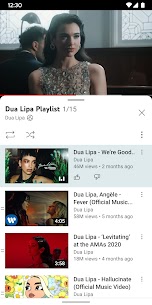
Background Playback and Multitasking Play videos or music with the screen off or while using other apps—no Premium subscription required. A floating mini-player option lets you drag the video anywhere on screen, perfect for note-taking, browsing, or messaging. This feature alone converts YouTube into a true audio companion for podcasts, lectures, or long music sessions.
SponsorBlock and Content Skipping Integrated SponsorBlock crowdsources timestamps for sponsored segments, intros, outros, filler, and self-promotion. The app skips them automatically.
Return YouTube Dislike and UI Tweaks The dislike count returns via community data. Users can hide Shorts entirely, restore classic navigation, customize playback speed defaults, set resolution caps for data saving, and apply AMOLED dark themes or custom icons.
HDR Support, Swipe Controls, and More Full high-dynamic-range video quality, precise gesture controls for seeking, volume, and brightness, and even download capabilities (when paired with external tools) round out the package. Hot-button remapping and hidden Shorts detection further refine the interface.
These features combine to create what many describe as the “premium” experience without the $13+ monthly fee.
How ReVanced Works: The Patching Process Explained
ReVanced’s modular design sets it apart. You download the official ReVanced Manager from revanced.app (or GitHub releases). It scans for compatible YouTube APKs—usually the latest “suggested” version listed in the app itself. You then fetch that exact APK from APKMirror (nodpi variant recommended for broadest compatibility). The Manager applies selected patches, compiles a new APK, and installs it.
For Google account login, you also install ReVanced MicroG (GmsCore), a lightweight replacement for Google Play Services. This keeps your subscriptions, history, and recommendations intact without full Google dependency.
The entire process takes under 10 minutes once you’re familiar with it. Updates follow the same workflow: download a new compatible YouTube APK when the Manager prompts you, re-patch, and install over the old version.
Step-by-Step Installation Guide for Non-Rooted Devices
- Download ReVanced Manager from the official GitHub releases or revanced.app. Enable “Install unknown apps” for your browser or file manager.
- Install ReVanced MicroG (GmsCore) first and sign in with your Google account.
- Fetch the recommended YouTube APK from APKMirror—match the exact version and architecture the Manager suggests.
- Open Manager → Patcher → Select the APK from storage → Choose patches (ad-blocking, SponsorBlock, etc., are usually pre-selected).
- Tap “Patch” and wait for compilation.
- Install the resulting APK. Grant storage and install permissions as needed.
Rooted users gain extra options like signature spoofing for seamless updates, but non-rooted installation works flawlessly on Android 8.0+. Always verify downloads with SHA-256 hashes where available.
Compatibility, Risks, and Best Practices
ReVanced runs on both rooted and non-rooted devices, though rooted setups offer easier long-term maintenance via Magisk modules in some forks. It supports most modern Android phones, including Pixels, Samsung Galaxy series, and OnePlus devices.
Important Caveats Using ReVanced violates YouTube’s Terms of Service. Google actively detects and sometimes throttles or bans accounts tied to modified clients, though many users report success with secondary accounts. Third-party pre-built APKs from random sites (even those branding themselves “ReVanced Advanced”) frequently contain malware—stick exclusively to official Manager + APKMirror workflow.
Battery and performance impact is minimal, but heavy patching can slightly increase app size. Always keep the Manager updated, and test patches incrementally if you encounter crashes.
Community Feedback and Real-World Usage
Reddit’s r/revancedapp remains the hub for troubleshooting and feature requests. Users praise the stability during YouTube’s ad experiments and appreciate how quickly patches adapt. Common praise includes “feels like the app Google should have shipped” and seamless background audio for workouts or commutes. Some power users on RVX forks highlight the extra Shorts controls as game-changers for focus.
Drawbacks? Occasional re-patching after major YouTube updates and the learning curve for first-timers. Yet the consensus is clear: once set up, ReVanced delivers the most polished ad-free experience available.
Alternatives Worth Considering
If patching feels too technical, options include NewPipe (fully open-source, no Google login), browser-based viewing with uBlock Origin extensions, or official YouTube Premium for those who want cloud features and offline downloads legally. Emerging forks like Morphe offer similar patching but with different development priorities.
Looking Ahead: The Ongoing Battle for User Control
YouTube continues evolving its ad ecosystem, background-play restrictions, and AI integrations. ReVanced’s community model—transparent, modular, and responsive—positions it well to adapt. As long as developers maintain the patcher and users support the project through contributions or careful security practices, enhanced viewing remains possible.
ReVanced (and its extended “advanced” variants) isn’t just software; it’s a statement about user agency in an increasingly paywalled digital landscape. Whether you choose the core project for simplicity or dive into RVX for every toggle imaginable, the result is the same: a YouTube experience that finally feels designed for you, not the advertisers. Setup once, enjoy endlessly—ads optional, control restored.
What's new
YouTube ReVanced Advanced APK v21.16.242
Download links
An ad will pop up before the download. Close it, click download again—ads keep us going, thanks!