
Raistar Macro Fire Ontap Sensi

Images


Related apps





Description
Mobile gaming has become more competitive, and many players look for ways to improve device responsiveness and visual quality. Raistar Macro Fire Ontap Sensi is one such Android tool that focuses on graphics adjustments and sensitivity-related customization. According to its official description, the app aims to help users adjust sensitivity preferences, improve visual settings, and create a smoother gaming experience.
Table of Contents
This article takes a closer look at its features, purpose, and what users can expect.
What is Raistar Macro Fire Ontap Sensi?
Raistar Macro Fire Ontap Sensi is an Android utility application developed to provide graphics and sensitivity customization options. The app description highlights tools related to graphics optimization, resolution adjustments, frame rate preferences, and customizable sensitivity controls.
Main Features
Sensitivity Adjustment Options
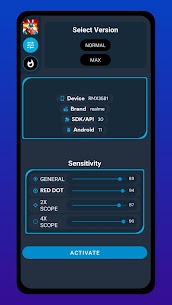
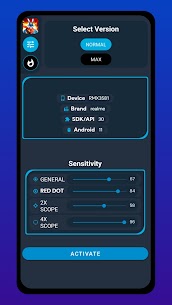
One of the primary functions of the app is sensitivity management. Sensitivity settings can affect how touch input feels during gameplay. The app provides controls designed to help users personalize these settings according to their preferences.
Different users prefer different touch responsiveness levels. Some players may want faster movement response, while others prefer more controlled handling.
Graphics Optimization Tools
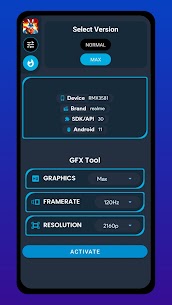
The application includes a GFX tool intended to improve visual settings such as:
- Graphics quality adjustments
- Resolution preferences
- FPS-related options
- Visual optimization controls
These settings are designed to give users additional customization over how supported games appear on their devices.
Performance Improvement Focus
The app description mentions reducing lag and improving responsiveness through available optimization features. Device performance varies depending on hardware capability, operating system version, and background processes, so results may differ between devices.
Optimization tools are commonly used by mobile users looking to improve overall experience without changing hardware.
Custom HUD Options
The app also references custom HUD layouts inspired by professional player styles. HUD customization allows users to personalize control placement according to comfort and usability preferences.
Customized layouts can help users organize screen controls based on their play style.
User Interface and Accessibility
Raistar Macro Fire Ontap Sensi is built as a lightweight Android utility application. Based on publicly available information, the tool focuses on straightforward settings access rather than complicated configuration menus.
Simple navigation is useful for users who want quick adjustments without spending time learning advanced controls.
Compatibility Information
Public app listings indicate Android support starting from Android 5.0 and above. Compatibility may vary depending on device specifications and operating system version.
Before installing any utility application, users should verify compatibility requirements through the official store listing.
Data and Privacy Information
According to the Google Play listing, developers provide information regarding data collection and security practices. The listing notes encrypted data transmission and available options related to data handling. Users can review current privacy information directly from the official application page before downloading.
Reviewing permissions and privacy details is always recommended when installing any mobile application.
Things to Keep in Mind
Performance optimization apps may behave differently across smartphones because mobile hardware varies widely. Factors that can influence experience include:
- Device processor capability
- Available RAM
- Operating system version
- Background applications
- Display specifications
Users should maintain realistic expectations and test settings gradually to find configurations suitable for their devices.
Final Thoughts
Raistar Macro Fire Ontap Sensi presents itself as a utility application focused on graphics customization and sensitivity management for Android users. Features highlighted by the developer include GFX options, sensitivity tools, custom HUD settings, and responsiveness improvements.
What's new
The most recent update contains: • Latest compliance update • Optimised the tools • Minor bugs solved • Improved stability
Download links
An ad will pop up before the download. Close it, click download again—ads keep us going, thanks!


