
MBWhatsApp

Images
Related apps



Description
If you feel limited by the standard features of WhatsApp and want deeper privacy controls, full visual customization, dual accounts, and extended media sharing, MBWhatsApp 2026 APK (MBiOS) is one of the most talked-about alternatives right now.
Table of Contents
Commonly known as WhatsApp MB, MBWA, or WAMB, this modified client is developed by StefanoYG and MBMods. It builds upon the official WhatsApp foundation but adds advanced customization layers, additional privacy toggles, and iOS-style interface elements not available in the original app.
In this in-depth review, I’ll explain exactly what MBWhatsApp is, how it works, what’s new in version 2.6.1, how to download and install it safely, how backups function, common issues, ban risks, and whether it’s truly worth using in 2026.
What Is MBWhatsApp (MBiOS) and What Is It Used For?
MBWhatsApp (MBiOS) is an unofficial modified version of WhatsApp for Android. It connects to the same messaging infrastructure but introduces an expanded feature set focused on:
- Advanced privacy control
- Interface customization
- Dual-account management
- Extended media sharing
- iOS-inspired design elements
In practical terms, MBWA is designed for users who want more control than the official client provides. Instead of relying on Meta’s limited toggles, you gain granular visibility management options and deeper personalization.
For example, you can:
- Hide your last seen without losing visibility of others
- Disable typing and recording indicators
- Freeze online status
- Remove forwarded tags
- Send higher-quality images and larger files
- Lock specific chats with password or fingerprint
- Install custom themes, fonts, and color packs
- Run multiple accounts on one device
It’s essentially WhatsApp with fewer restrictions—but that freedom comes with trade-offs, which I’ll cover in the safety section.
Main Features of MBWhatsApp 2026 APK
1. iOS-Style Interface (MBiOS Design)
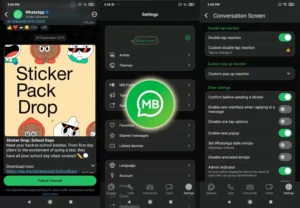
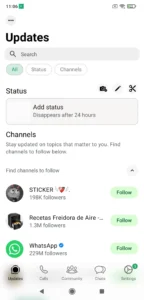
One of MBWhatsApp’s defining characteristics is its iPhone-inspired UI. The bottom navigation bar, smooth iconography, and dynamic transitions mimic the look of WhatsApp on iOS devices.
Unlike the official Android version, MBiOS introduces:
- Bottom-aligned navigation tabs
- Redesigned status and call icons
- Refined animations
- iOS emoji packs
- Customizable navigation bar icons
This visual layer is particularly appealing to Android users who prefer Apple’s clean interface design but don’t want to switch ecosystems.
2. Advanced Privacy Controls
Privacy is where MBWA truly stands out.
You can individually configure:
- Who can call you
- Who can see you online
- Who can view your status
- Blue tick visibility
- Second tick confirmation
- Typing/recording indicators
You can even freeze your last seen timestamp while still monitoring others in real time—something not possible in the official version.
These controls operate at account level and per-contact level, offering far more granularity than Meta’s native implementation.
3. Dual Accounts & App Cloning
MBWhatsApp allows you to run two WhatsApp accounts on the same Android device without uninstalling the original client.
This is particularly useful for:
- Business + personal number separation
- Managing multiple SIM cards
- Content creators handling community accounts
- Freelancers communicating with clients separately
Unlike standard Android app cloning, MBWA integrates this functionality natively.
4. Extended Media Sharing
MBWhatsApp expands multimedia limits by allowing:
- Larger video uploads
- Higher-quality image transmission
- Extended status character limits (up to 250 characters)
- Motion picture support
- Document scanning functionality
This makes it more suitable for professional or media-heavy communication use cases.
5. Custom Themes & Deep Personalization
MBWhatsApp includes access to thousands of downloadable themes. You can modify:
- Chat bubble colors
- Background wallpapers
- Font style and size
- Icon packs
- Navigation bar appearance
- Dark mode behavior
The dynamic color picker and theme manager give near-total control over the visual environment.
6. Built-In Tools & Extra Utilities
Additional tools include:
- Integrated sticker creation
- Automatic replies
- Scheduled messaging
- AI photo generator
- Chat-level password lock
- Hide media from gallery
- Block message deletion
These features transform MBWA from a simple messaging app into a highly configurable communication tool.
Differences Between Official WhatsApp and MBWhatsApp
Privacy
Official WhatsApp offers limited visibility controls. MBWA allows freezing last seen, hiding typing indicators, blocking calls, and more granular settings.
Customization
The official client maintains uniform design consistency. MBWA offers thousands of themes and full interface redesign capabilities.
Multi-Account
Official version supports one active number per installation. MBWhatsApp enables dual-account usage.
Extra Features
Official app excludes chat locks, anti-delete features, and integrated sticker tools. MBWA includes them.
The trade-off? Official builds offer higher security assurance and official support.
Is There MBWhatsApp Web?
There is no official MBWhatsApp Web client because only the official Meta servers support browser-based QR authentication.
If you want to use MBWA on PC, your options are:
- Android emulators like BlueStacks
- Android emulators like LDPlayer
Alternatively, you can use official WhatsApp Web, but that removes MOD-specific features.
How to Download MBWhatsApp 2026 APK
MBWhatsApp is not available on the Google Play Store because it is unofficial.
To download:
- Visit a trusted APK repository.
- Download the latest MBWhatsApp 2.6.1 APK file.
- Wait for download completion.
- Scan the file with antivirus software before installing.
Always back up chats before installing any modified version.
How to Install MBWhatsApp Without Losing Data
- Open official WhatsApp.
- Go to Settings > Chats > Backup.
- Create a local backup.
- Locate the msgstore file in internal storage.
- Enable Unknown Sources in Android settings.
- Install MBWhatsApp APK.
- Verify your phone number.
- Tap Restore when prompted.
Since Google Drive sync is unsupported, restoration relies entirely on local backup files.
MBWhatsApp Backup System Explained
Backups are stored locally in internal storage, typically inside:
Internal Storage > WhatsApp MB > Databases
There is no cloud integration. If you lose the device without manual export, chat history is lost permanently.
Common MBWhatsApp Problems & Fixes
Notifications not arriving:
Check battery optimization settings and notification permissions.
App crashing after theme change:
Clear cache and reset theme to default.
Installation failed error:
Ensure Android 5.0+ and sufficient storage space.
Server connection issue:
Clear app data and verify internet connection.
WhatsApp Ban: Temporary vs Permanent
Using MODs increases ban risk.
Temporary Ban
- Wait 24–48 hours
- Switch back to official WhatsApp
- Avoid excessive automation features
Permanent Ban
- Number cannot be recovered
- Register a new number
- Contact Meta (no guarantee of reinstatement)
Anti-ban patches help but do not eliminate risk.
Is MBWhatsApp Safe?
From a malware perspective, safety depends entirely on the source of the APK file.
However:
- It is not signed by Meta
- Code modifications are not publicly audited
- Cloud backups are unavailable
- Ban risk exists
Data still passes through official WhatsApp servers, but client-side modifications introduce uncertainty.
Use only trusted repositories and avoid suspicious versions.
Is MBWhatsApp Free?
Yes. MBWhatsApp 2026 is completely free to download and use. There are no subscriptions or in-app purchases.
When You Should NOT Use MBWhatsApp
Avoid MBWA if:
- You rely heavily on Google Drive backups
- You require official business compliance
- You cannot risk account suspension
- You prioritize maximum encryption transparency
- You depend on WhatsApp Web daily
For enterprise or regulated communication, the official client is safer.
Pros and Cons
Pros
- Massive theme library
- Advanced privacy controls
- Dual-account support
- Extended media limits
- Integrated utilities
Cons
- Ban risk
- No Google Drive sync
- Manual updates
- No official support
- Possible compatibility issues after Android updates
FAQs About MBWhatsApp 2026
Can MBWhatsApp work alongside official WhatsApp?
Yes, in most cases you can run both simultaneously if package names differ.
Does MBWhatsApp support Android 14?
Version 2.6.1 includes Android 14 compatibility improvements.
Will I lose chats when switching?
Not if you create a local backup first and restore correctly.
Is end-to-end encryption guaranteed?
Encryption uses WhatsApp’s infrastructure, but modified client layers are not independently audited.
How often is MBWhatsApp updated?
Updates depend on the developers and server compatibility requirements.
Can I use WhatsApp Web with MBWhatsApp?
Not directly. Only the official client supports web QR linking.
Final Verdict
MBWhatsApp 2026 APK (MBiOS) is one of the most feature-rich WhatsApp MODs currently available. It offers unmatched visual customization, granular privacy controls, and dual-account flexibility.
However, those advantages come with measurable risks: account bans, lack of official support, manual updates, and no cloud backups.
If you value customization and control more than ecosystem security, MBWhatsApp can be a powerful alternative. If stability, compliance, and guaranteed support matter more, sticking with the official client is the safer decision.
Would you like a comparison breakdown between MBWhatsApp and other MODs like GBWhatsApp or WhatsApp Plus next?
What's new
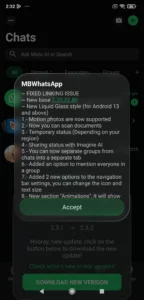
Version 2.6.1 focuses heavily on stability and Android 14 compatibility.
Key updates include:
- Built on base version 2.25.32.75
- Faster chat loading
- Improved cache optimization
- Refined advanced settings panel
- Auto light/dark mode synced with Android
- Fixed crashes during theme switching
- Enhanced local backup management
- Mention all group members feature
- New animation section
- Navigation bar icon resizing
These refinements indicate active development, which is essential for MOD survival against server-side detection updates.
Download links
An ad will pop up before the download. Close it, click download again—ads keep us going, thanks!


