
GStream
April 13, 2026
27.5 MB
5.5.5
Android

Images
Related apps





Description
Streaming live TV and online content on Android devices has evolved rapidly, yet many users still find themselves battling endless buffering, clunky interfaces, and restrictive compatibility. GStream enters this space as a powerful, flexible, and performance-driven solution. Built with modern playback technology, it focuses on delivering a smooth, high-quality streaming experience with minimal interruptions. Whether you are a dedicated cord-cutter managing IPTV playlists or a massive live sports fan, understanding how GStream operates can revolutionize your mobile viewing experience.
Table of Contents
What is GStream and Who is it For?
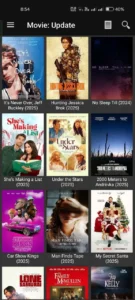
It is crucial to understand right out of the gate that GStream is not a content provider like Netflix or Hulu. You will not find a built-in library of movies or shows upon launching the app. Instead, GStream is a highly optimized, dedicated media player designed specifically to handle external live TV channels, online streams, and playlist-based content.
This app acts as a blank, highly capable canvas. By importing your own playlists, managing live channels, and utilizing Electronic Program Guide (EPG) data, you gain absolute control over what you watch. This makes it an incredibly powerful tool for users familiar with sourcing their own media links, but it may not be the right fit for someone seeking a simple, plug-and-play service right out of the box.
Engineered for High-Speed Playback
One of the most critical aspects of any streaming application is how it handles real-time playback. GStream utilizes an optimized streaming engine specifically designed to reduce buffering times and improve consistency. It intelligently adapts to your current network conditions, allowing it to maintain the continuity of your stream even when your bandwidth fluctuates.
Beyond network adaptability, the player features smart video decoding. This advanced rendering technique ensures smoother frame transitions and vastly improved audio-to-video synchronization. This is particularly vital when streaming high-definition channels or fast-paced live sports, where even a slight stutter can ruin the experience. Furthermore, if your connection drops, GStream features a brilliant auto-reconnect system that automatically attempts to restore the feed without requiring you to manually refresh. Coupled with lightning-fast channel switching, it completely eliminates the frustrating lag that plagues many alternative media players.
Seamless Playlist and EPG Management
GStream truly shines when tasked with organizing massive libraries of streaming content. The app boasts deep compatibility with multiple playlist formats, most notably M3U, M3U8, and direct streaming URLs. Importing your media is incredibly straightforward—you simply enter a web link or upload a local file directly from your device.
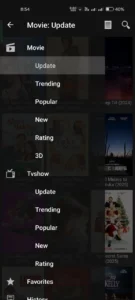
Once your playlist is loaded, GStream transforms from a basic player into a comprehensive, TV-like experience thanks to its Electronic Program Guide (EPG) integration. The EPG allows you to view upcoming program schedules and navigate channels based on real-time broadcasting blocks. To help you manage what could be thousands of channels, the app includes robust organizational tools. You can easily group channels by category, apply custom sorting methods, and pin your most-watched networks to a dedicated favorites section for instant access.
Deep Customization and Device Compatibility
Customization is a major strength of GStream, catering perfectly to both casual viewers and advanced streaming enthusiasts. If you prefer not to use the highly capable built-in engine, the app fully supports routing your streams to external, third-party video players. If you stick with the internal player, you are granted extensive playback controls, including aspect ratio adjustments, audio track selection, and comprehensive subtitle support.
The user interface is equally adaptable. You can toggle a comfortable dark mode for night viewing, select different visual themes, and adjust the layout to fit your screen. Because GStream is designed to be universally compatible across the Android ecosystem, its interface scales beautifully whether you are using a compact smartphone, a tablet, or navigating with a remote on an Android TV set-top box.
Installation, Performance, and Security
Because GStream does not host content or run heavy background tasks, it is incredibly lightweight. It won’t drain your battery excessively and performs smoothly even on mid-range or older hardware, adapting well whether you are on stable home Wi-Fi or a moderate mobile data connection.
Getting the app running usually requires sideloading via an APK file. This straightforward process involves downloading the application from a trusted source, enabling the “Unknown Sources” permission in your Android security settings, and executing the file. Because you are installing outside the Google Play Store, digital hygiene is essential. Always ensure you are downloading from a reputable site, avoid modified versions of the app, and run the file through an antivirus scanner just to be safe. Since GStream merely acts as a player, it doesn’t track what you watch; your digital privacy ultimately relies on the safety and legitimacy of the playlist URLs you choose to provide.
Troubleshooting Common Hurdles
Even with top-tier optimization, streaming can occasionally be finicky. If you encounter frequent buffering, the issue is almost always tied to a slow internet connection or an overloaded source server; switching to a lower-quality stream or a more stable network usually clears this up immediately.If your channels are refusing to load entirely, the culprit is likely a broken or expired link within your playlist. Refreshing the list or importing updated URLs from your provider is the quickest fix. Similarly, if your EPG data isn’t populating, double-check that your EPG URL is correct and try manually forcing a sync. Finally, if the app itself ever crashes or behaves sluggishly, performing a simple cache clear in your Android settings or reinstalling the application will generally return things to normal.
The Final Verdict
GStream stands out as a highly capable, top-tier media player for Android users who value flexibility, speed, and customization. It does not try to be a comprehensive content library. Instead, it provides a rock-solid, highly tailored environment for your personal IPTV setups and streaming links. If you are willing to spend a few minutes configuring your sources, GStream offers tremendous value and a vastly superior viewing experience compared to standard, bare-bones media players.
What's new
GStream
Download links
An ad will pop up before the download. Close it, click download again—ads keep us going, thanks!


