
Fake GPS Joystick & Routes Go
JIB Software UG (haftungsbeschränkt)
Oct 5, 2025
2.79 MB
1.7.1
6.0

Images




Related apps





Description
Location-based applications have transformed the way we interact with mobile devices. From AR games like Pokémon Go to geo-restricted apps, dating platforms, and region-locked services, GPS positioning plays a central role in user experience. However, there are situations where users may want more control over their virtual location.
Table of Contents
In this detailed review, I’ll break down everything you need to know about Fake GPS Joystick & Routes Go (Google Play link provided above). I’ll cover its purpose, key features, real-world use cases, installation steps, safety considerations, performance expectations, limitations, and troubleshooting tips — all written from a practical, experience-based perspective.
If you’re researching how GPS spoofing works on Android, or considering this app for testing, gaming, or development purposes, this guide will help you make an informed decision.
What Is Fake GPS Joystick & Routes Go?
Fake GPS Joystick & Routes Go is an Android application that allows users to simulate a different GPS location on their device. Instead of physically traveling somewhere, the app enables you to set a virtual location and move around using an on-screen joystick or predefined routes.
Core Purpose
The primary function of the app is to override your device’s GPS coordinates by using Android’s built-in “Mock Location” feature. Once activated, apps that rely on GPS will detect the simulated location instead of your real one.
Who Typically Uses It?
From my analysis, the app is commonly used by:
- AR game players (especially location-based games)
- App developers testing geo-features
- QA testers
- Social media users experimenting with location tags
- Privacy-focused users who prefer masking real coordinates
It’s important to note that using GPS spoofing in games or services may violate their terms of service. Always review platform policies before using any mock location tool.
Key Features of Fake GPS Joystick & Routes Go
Let’s break down the core features and how they function in practical scenarios.
1. Joystick Movement Control
The standout feature is the floating GPS joystick overlay. Once enabled, it allows real-time movement in any direction.
Why this matters:
Instead of teleporting instantly from one location to another, you can simulate walking speed. This is particularly useful for apps that monitor unnatural movement patterns.
You can:
- Adjust movement speed
- Walk, jog, or simulate driving
- Change direction smoothly
This makes the spoofed movement appear more realistic compared to static location changers.
2. Route Simulation
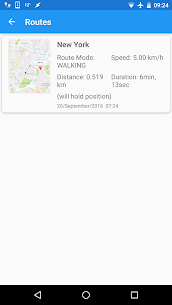
One of the most advanced features is automated route creation.
You can:
- Select multiple points on a map
- Create a looped path
- Adjust movement speed along the route
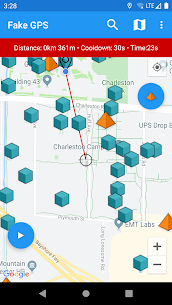
- Automate repetitive movement
Use case example:
If testing an app that tracks walking routes, you can simulate daily commute patterns without physically moving.
For AR game players, route simulation mimics real-world exploration behavior.
3. Teleport Mode
Teleport mode allows instant relocation to any coordinates worldwide.
You can:
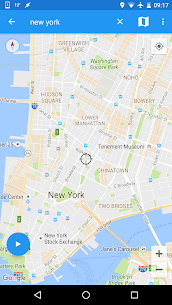
- Search by city name
- Enter exact latitude and longitude
- Drop a pin manually
While powerful, teleporting frequently can trigger detection systems in certain apps. It’s best used carefully and responsibly.
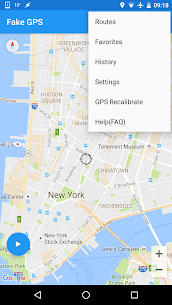
4. Favorite Locations & History
The app stores:
- Previously used locations
- Favorite saved coordinates
- Quick access points
This is convenient for users who repeatedly simulate the same regions.
5. Map Interface Integration
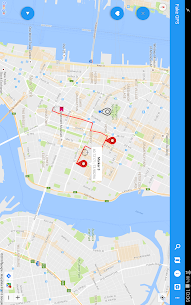
The interface is intuitive and Google Maps-style. Users can zoom, search, and pin locations easily. The layout is clean and beginner-friendly, making setup straightforward even for non-technical users.
How to Download and Install Fake GPS Joystick & Routes Go
Since this app is available on the official Google Play Store, installation is simple.
Method 1: Install from Google Play (Recommended)
- Open Google Play Store.
- Search for “Fake GPS Joystick & Routes Go”.
- Confirm the developer name.
- Tap Install.
- Wait for download and installation to complete.
Enabling Mock Location (Required Step)
After installation:
- Go to Settings → About Phone.
- Tap “Build Number” 7 times to enable Developer Options.
- Go back to Settings → Developer Options.
- Tap “Select Mock Location App”.
- Choose Fake GPS Joystick & Routes Go.
Without this step, the app will not override GPS location.
Safety Analysis – Is Fake GPS Joystick & Routes Go Safe?
This is where many users hesitate. Let’s analyze objectively.
Official Play Store Availability
Since it’s hosted on the Google Play Store, the app passes Google’s baseline security checks. That reduces malware risk compared to unknown APK sources.
Permissions
Typical permissions include:
- Location access
- Overlay permission
- Internet access
These are expected for GPS spoofing functionality.
Privacy Considerations
The app changes your GPS location, but it does not inherently hide your IP address. For complete anonymity, users would need additional privacy tools (like VPN services).
Account Risk Warning
If used in games like Pokémon Go, spoofing may violate the game’s policies. This can result in:
- Temporary soft bans
- Account suspension
- Permanent bans
Always consider the risk before using spoofing tools in online platforms.
Performance & Stability
Based on technical expectations:
- Works smoothly on most modern Android devices.
- Minimal battery impact when idle.
- Higher battery drain during continuous route simulation.
- Stability depends on Android version and device optimization settings.
On aggressive battery management systems (e.g., some Xiaomi or Huawei phones), you may need to disable battery optimization for proper background operation.
Common Issues & Troubleshooting
1. Location Not Changing
Possible causes:
- Mock location not enabled
- Another GPS app conflicting
- Device location mode set to “High Accuracy”
Fix:
- Ensure the app is selected under Developer Options.
- Disable other location spoofers.
- Restart device after setup.
2. Joystick Not Appearing
Cause: Overlay permission disabled.
Fix:
- Go to App Settings → Enable “Draw Over Other Apps”.
3. App Crashes
Possible reasons:
- Outdated Android version
- Corrupted installation
Fix:
- Update the app
- Clear cache
- Reinstall from Play Store
When You Should NOT Use Fake GPS Joystick & Routes Go
This app may not be suitable if:
- You rely on precise GPS navigation (e.g., delivery drivers).
- You use banking apps with location-based fraud detection.
- You’re uncomfortable adjusting developer settings.
- You’re using a company-managed device.
Mock location settings can interfere with real GPS accuracy until disabled.
Who Should Use It?
This app is ideal for:
- Developers testing geo-dependent applications.
- QA testers.
- Privacy-conscious users masking location.
- AR game experimenters (with risk awareness).
Frequently Asked Questions (FAQs)
1. Does Fake GPS Joystick & Routes Go require root access?
No. It works using Android’s built-in mock location feature and does not require rooting your device.
2. Can this app hide my IP address?
No. It changes GPS coordinates only. It does not alter your IP-based location.
3. Will apps detect that I’m spoofing GPS?
Some apps can detect mock location usage. Detection depends on their anti-spoofing mechanisms.
4. Does it work on Android 13 and newer?
Generally yes, but compatibility may vary depending on device manufacturer restrictions.
5. Can I use it on iOS?
No. This is an Android-only application.
6. Is it legal to use GPS spoofing apps?
Using mock location tools is legal in most regions. However, violating an app’s terms of service may lead to account penalties.
Final Verdict
Fake GPS Joystick & Routes Go is a feature-rich GPS spoofing app for Android users who need controlled location simulation. It offers joystick navigation, route automation, teleport functionality, and a user-friendly interface.
For developers and testers, it provides a powerful and flexible tool. For gamers, it carries potential risk depending on platform policies. For privacy-focused users, it offers partial location masking — though not complete anonymity.
As with any GPS spoofing tool, use it responsibly and understand the implications before activating it.
What's new
- optimizations for Android 15 and a few extra features
- fix notification issue with Android 13
- fix import routes/database issue with Android 13
old
-Fix stop button notification
-Fix Import/Export DB and GPX Files for Android 11+
-Cooldown calculation, stops/gyms
-Android 10 smali patcher fix
-Android 10 new spoofing mode in setting
-GPX file import - routes list
-Unlimited waypoints for routes
-Catch-a-rex
-Fly GPS Joystick over any app
-Import/Export of faves,routes
Download links
An ad will pop up before the download. Close it, click download again—ads keep us going, thanks!


