
Clone App – Parallel Dual Space

Clone App MOD APK Info
The Clone App Mod APK offers a premium experience by unlocking all VIP features without a subscription. Users can bypass the standard limitations of the free version, gaining access to unlimited app cloning for social media and gaming. Crucially, this specific mod ensures that the “VIP Unlocked” status is active, which removes all intrusive advertisements for a seamless user interface. Additionally, it grants full access to advanced privacy tools—such as the Device ID Changer, Fake GPS, and the Privacy Vault—allowing users to maximize the potential of the “Chaos Engine” for superior device camouflage and identity protection.
Images


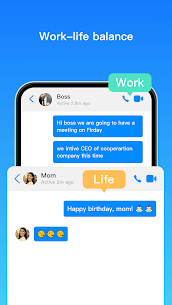


Related apps




Description
For years, smartphone users have faced a binary choice: carry two phones or constantly log in and out of accounts. Whether you are a social media manager handling five Instagram profiles, a professional trying to keep WhatsApp work chats separate from family groups, or a gamer grinding two accounts in Mobile Legends, the struggle is real.
Table of Contents
While some manufacturers (like Xiaomi with “Dual Apps” or Samsung with “Secure Folder”) offer limited native solutions, they are often restricted to a few specific social apps and usually only allow one extra copy.
Clone App by Pengyou steps in as a third-party solution designed to obliterate these limits. It allows you to run multiple instances of almost any app installed on your phone simultaneously. But it claims to be more than just a cloner; it markets itself as a privacy engine, offering features like fake GPS, device ID changing, and private vaults. But does it deliver? Let’s find out.
What is Clone App? Understanding the Technology
To understand how Clone App works, you must understand Virtualization Technology.
Unlike standard apps, Clone App functions as a Virtual Machine (VM) or a “container” on your Android system. When you “clone” an app like WhatsApp inside Clone App, you aren’t actually installing WhatsApp a second time on your phone’s operating system. Instead, Clone App creates a virtual environment—a sandbox—inside itself.
The “Chaos Engine”
Pengyou developers often refer to their proprietary technology as the “Chaos Engine.” This engine intercepts the cloned app’s requests to the Android system.
- Storage Isolation: When the cloned WhatsApp tries to save a photo, the Chaos Engine directs it to a separate, isolated folder within Clone App’s storage, keeping it away from your main gallery.
- Process Isolation: The cloned app runs as a sub-process of Clone App, which is why your phone sees it as one app running, even if you have five clones open inside it.
This virtualization is what allows features like Device Camouflage. Since the app is running in a controlled virtual environment, Clone App can “lie” to the cloned app about your phone’s details, such as its model, IMEI, or location.
Key Features Breakdown
Clone App is packed with features that go beyond simple duplication. Here is a detailed look at what it offers:
A. Unlimited Multi-Account Cloning
The core feature is the ability to clone apps like WhatsApp, Facebook, Messenger, LINE, and Snapchat.
- Simultaneous Operation: Unlike logging out and back in, both the original app and the cloned app run at the same time. You receive notifications for both in real-time.
- Zero Data Crossover: Data from your main account never touches the cloned account. They are completely hermetically sealed from each other.
B. Private Vault & App Hider
Privacy is a massive pillar of this application.
- App Hider: You can import an app into Clone App and then uninstall the original from your phone. The app continues to live inside Clone App, effectively hiding it from anyone looking through your app drawer.
- Private Album: Securely store photos and videos that you don’t want showing up in your main Google Photos or Gallery app.
- App Lock: You can set a password, pattern, or fingerprint lock specifically for accessing the Clone App interface, adding a second layer of security.
C. Color Modes & Themes
Functionality meets aesthetics. You can customize the icon of the cloned app. For example, you can make your “Work WhatsApp” icon blue and your “Personal WhatsApp” icon green to avoid sending a meme to your boss accidentally. Additional “Dark Mode” support is available even if the original app doesn’t fully support it.
D. Magic Stickers (Emojis)
The app includes a feature that allows you to send “Magic Stickers” or dynamic emoticons during chats in cloned social apps, adding a fun layer to the interaction, though this is secondary to the utility features.
The “Device Camouflage” Advantage
This is the “Killer Feature” that distinguishes Clone App (Pengyou) from standard competitors like Parallel Space. Because the apps run in a virtual machine, Clone App can intercept system calls and modify the data returned to the app.
Why is this useful?
- Device ID Changer: Some apps ban users based on their device’s unique ID (IMEI or Android ID). By creating a clone with a new, randomly generated Device ID, you can theoretically bypass device bans.
- Fake GPS (Location Spoofer): You can set a specific location for a cloned app.
- Use Case: You want to match with people in London on Tinder, but you are physically in New York. You can set the cloned Tinder’s location to London without affecting your Google Maps navigation in the main system.
- Brand/Model Disguise: You can make your Samsung phone appear as a Google Pixel to the cloned app. This can sometimes unlock device-specific features or graphics settings in games.
Note: These features are often locked behind the VIP subscription.
Step-by-Step User Guide
Phase 1: Installation and Setup
- Download: Navigate to the Google Play Store and search for “Clone App” by Pengyou, or download the APK from a reputable source if you need a specific version.
- Permissions: Upon launching, you will be bombarded with permission requests. Do not be alarmed. (See the “Safety” section below). Grant the storage and phone permissions required for the engine to run.
- The Dashboard: You will be greeted by a clean interface showing a list of apps installed on your phone that are eligible for cloning.
Phase 2: Cloning an App (e.g., WhatsApp)
- Tap the “+” (Plus) button on the main screen.
- Find WhatsApp in the list and tap “Clone”.
- The app will process for a few seconds. Once done, a new WhatsApp icon will appear on the Clone App dashboard.
- Optional: Tap the three dots on the new icon to “Create Shortcut”. This places the cloned WhatsApp on your actual phone home screen for quick access.
- Launch the clone. You will see the standard WhatsApp setup screen. Register with your second phone number.
Phase 3: Using Device Camouflage (VIP)
- Before launching the clone, tap the settings/gear icon associated with that specific clone.
- Select “Device Privacy” or “Device Camouflage”.
- Tap “Open a new device ID” to generate a random ID.
- Select “Fake GPS” and choose a location on the map.
- Save settings and launch the app.
Gaming with Clone App: A Special Focus
Gamers are a massive demographic for Pengyou’s Clone App. The ability to “farm” on two accounts or “smurf” (play on a lower-ranked account) is highly sought after.
Supported Games
The app claims optimization for:
- Garena Free Fire
- Mobile Legends: Bang Bang (MLBB)
- Clash of Clans (CoC)
- Roblox
The “Gold Farming” Setup
Many strategy games allow you to transfer resources. By running your main account on the native OS and a “farm” account in Clone App, you can transfer resources to yourself.
- Performance: Gaming requires heavy resources. Ensure your phone has at least 6GB or 8GB of RAM. The virtualization engine adds overhead. If your phone is a budget device, running two instances of Genshin Impact will likely crash the phone.
- Ban Risk: Warning. Anti-cheat systems in modern games (like PUBG New State or CoD Mobile) are sophisticated. They can sometimes detect virtualization environments. While Clone App’s “Device Camouflage” helps hide this, it is never 100% risk-free. Always use a secondary account to test before risking your main account.
Privacy, Safety, and Permissions
This is the most controversial aspect of any app cloner.
The Permission Paradox
Users often leave 1-star reviews saying, “Why does this app need access to my contacts, location, and camera?”
The Explanation: Clone App is a container. It doesn’t know which app you will clone.
- If you clone WhatsApp, the container needs Contact access to sync your friends.
- If you clone Instagram, the container needs Camera access to take photos.
- If you clone Maps, the container needs Location access.
Because Android permissions are granted to the Host App (Clone App), it must request every permission any potential clone might need. If you deny the Camera permission to Clone App, your cloned Instagram will crash when you try to post a Story.
Is Data Collected?
Pengyou’s privacy policy states they do not collect personal data (like message contents). However, they do collect device data and crash logs.
- Ad Tracking: The free version is ad-supported. This means ad networks (like Google AdMob or Facebook Audience Network) integrated into the app will track your usage to serve relevant ads.
Verdict on Safety
- Malware: The Play Store version is generally safe from malware. Be very careful downloading “Modded” or “Cracked” APKs of Clone App from random websites, as these often contain actual spyware.
- Privacy: It is safe for social apps and gaming. Recommendation: Avoid cloning banking apps or cryptocurrency wallets. While there is no evidence of theft, the complexity of virtualization increases the “attack surface.” It is better to keep financial apps on your secure, native OS.
VIP Membership: Is it Worth It?
Clone App operates on a “Freemium” model.
Free Version:
- Usually limited to 1 clone per app (e.g., 1 original WhatsApp + 1 Clone).
- Contains Ads (Banner ads and Full-screen interstitials).
- Basic privacy features.
VIP / Gold Membership:
- Unlimited Clones: Run 10 copies of Facebook if you want.
- No Ads: A seamless experience.
- Device Camouflage: Access to the ID Changer and Fake GPS.
- Virtual Keyboard: A security feature that prevents your main keyboard (like Gboard) from learning what you type inside the clone (useful for passwords).
Recommendation: If you only need one extra WhatsApp for business, the Free version is sufficient. If you are a gamer needing device spoofing or a power user managing 5+ accounts, the VIP subscription is necessary to remove the annoying ads and unlock the “Chaos Engine’s” full potential.
Clone App vs. Competitors
| Feature | Clone App (Pengyou) | Parallel Space | Dual Space | App Cloner (AppListo) |
|---|---|---|---|---|
| Technology | Virtual Machine | Virtual Machine | Virtual Machine | APK Modification |
| Device Spoofing | Excellent (VIP) | Basic | Basic | Excellent |
| Stability | High | Medium | Medium | Very High |
| Gaming Support | High | Medium | Medium | Low (Hard to mod games) |
| Ease of Use | Easy | Very Easy | Very Easy | Expert / Difficult |
| Ads (Free) | High | High | High | None (Free version limited) |
Why choose Clone App (Pengyou)? It hits the sweet spot between the ease of use of Parallel Space and the advanced technical features (like Device ID changing) of App Cloner. It is easier to set up than App Cloner but more powerful than Parallel Space.
Troubleshooting Common Issues
Issue 1: Not Receiving Notifications
- Cause: Battery optimization features on Android kill background processes to save power. Since Clone App runs clones as background sub-processes, the system often kills them.
- Fix: Go to Phone Settings > Battery > App Launch/Optimization. Find Clone App and set it to “Unrestricted” or “Do Not Optimize”. You must allow it to run in the background.
Issue 2: “Google Play Services” Error in Cloned Games
- Cause: Some games rely on Google Play Games for login. Virtual machines sometimes struggle to connect to the host’s Google services.
- Fix: In Clone App settings, look for “Google Play Services Mode” and ensure it is enabled. If it fails, try using Facebook Login or Guest Login for the game instead of Google Login.
Issue 3: App Crashes Immediately
- Cause: 64-bit vs. 32-bit library mismatch. Modern apps are 64-bit, but some older virtualization engines are 32-bit.
- Fix: Check if Clone App asks you to install a “64-bit Support Plugin”. This is often a separate small app download required to run heavy modern apps.
Conclusion
Clone App (com.pengyou.cloneapp) is a robust, feature-rich tool that solves a fundamental Android limitation. It transforms your single device into a multi-account powerhouse.
For the casual user, it is a convenient way to separate work and play on WhatsApp. For the enthusiast and gamer, the Device Camouflage features offer a level of control and privacy that few competitors match. While the ad-heavy nature of the free version can be testing, the utility it provides is undeniable.
Download links
An ad will pop up before the download. Close it, click download again—ads keep us going, thanks!


