Alight Motion

Images
Related apps



Description
Alight Motion has 100 million+ downloads on Google Play. That number alone tells you this isn’t just another video editor people try once and forget. Mobile creators, animators, and short-form video editors keep coming back to it because it does things most phone apps simply can’t.
Table of Contents
This guide covers everything: what the app actually does, who it’s built for, what the features look like in practice, and what to expect after you install it.
What Is Alight Motion?
Alight Motion is a professional-grade motion graphics and video editing app built by Alight Creative. The Android version launched years before most competitors took mobile editing seriously, and it still holds a strong lead in one specific area: animation.
Where apps like CapCut or VN focus on quick cuts and templates, Alight Motion gives you a proper timeline with keyframe controls. You can animate individual properties, layer effects, and build motion graphics from scratch directly on your phone.
Who Actually Uses This App?
The majority of Alight Motion’s user base falls into 3 groups.
First, TikTok and Instagram Reels creators who want their edits to look more polished than what preset-based apps produce. Second, animators who need frame-by-frame control on mobile without switching to a desktop. Third, graphic designers who want to add motion to static assets without learning After Effects.
It’s also popular among gaming content creators. The app handles screen recordings well and gives you enough color tools to make gameplay footage look cinematic.
Core Features You’ll Actually Use
Multi-Layer Timeline
Alight Motion’s timeline supports video, image, audio, shape, and text layers simultaneously. You can stack as many as your device can handle. Each layer sits independently, so adjusting one doesn’t shift everything else out of alignment.
This is the feature that separates it from most mobile editors. Real layer-based editing on a 6-inch screen actually works here.
Keyframe Animation
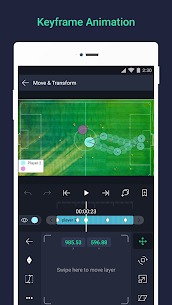
Every single property in Alight Motion supports keyframes. Position, scale, rotation, opacity, color, blur radius — all of it. You set a value at one point in time, set a different value at another, and the app interpolates between them.
You can also adjust easing curves. Linear, ease-in, ease-out, or custom bezier. That level of control on mobile is rare.
Vector and Bitmap Support
Most mobile editors only work with raster (bitmap) assets. Alight Motion supports both. Vector shapes stay sharp at any zoom level, which matters a lot when you’re working on text animations or logo work.
You can draw shapes directly inside the app, apply fills, strokes, gradients, and then animate those properties over time.
Effects and Blending Modes
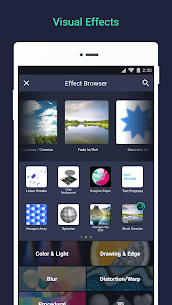
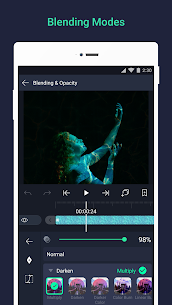
The effects library includes color correction tools, blur effects, glow, distortion, and chromatic aberration, among others. Blending modes like Screen, Multiply, and Overlay work exactly the way they do in Photoshop or After Effects.
These aren’t decorative presets. They’re functional tools that let you build specific visual results instead of just picking from a dropdown of canned looks.
Motion Blur
Alight Motion applies real motion blur to animated elements. When something moves fast across the frame, the edges blur in the direction of motion. This makes animations look physically believable instead of mechanical.
It’s a small detail that most users don’t consciously notice. But its absence is always obvious.
Color Grading
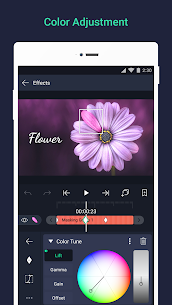
The color tools go beyond a basic brightness/contrast slider. You get hue, saturation, luminance controls per color channel, plus curve adjustments. If you’ve color-graded in Lightroom or Premiere, the workflow here will feel familiar.
For phone footage, even a basic LUT-style grade using these tools makes a significant difference.
Alight Motion Subscription: Free vs. Premium
The free version is functional. You can edit, animate, and export. But it exports with a watermark and caps some effects.
The paid plan (Alight Motion Pro) removes the watermark, unlocks the full effects library, and gives access to higher export resolutions. As of the latest version, the subscription runs on a monthly or annual basis through the Google Play billing system.
If you’re just testing the app, the free tier gives you a genuine sense of what it can do. If you’re publishing content professionally, the watermark becomes a problem fast.
System Requirements and Performance
Alight Motion runs on Android 5.0 and above. The app itself is around 80-100MB at install, but project files grow quickly depending on how many assets you import.
Performance varies by device. On mid-range phones (Snapdragon 6-series or equivalent), playback at full resolution can stutter with 4+ layers and active effects. Rendering to export is slower on these devices too. On a flagship phone, real-time preview is smooth for most project types.
The app doesn’t have a desktop version. Everything happens on the phone, which is both the appeal and the limitation.
Alight Motion vs. Other Android Video Editors
CapCut is faster to learn and better for template-based edits. If you want a polished 30-second clip in 10 minutes, CapCut wins. But it doesn’t give you keyframes or real layer control.
KineMaster is the closest competitor in terms of features. It also has a proper timeline and supports multiple layers. The difference is in animation. Alight Motion’s keyframe system and easing controls are more precise, and the vector support puts it ahead for motion graphics specifically.
Adobe Premiere Rush is a legitimate option if you’re already in the Adobe ecosystem. It syncs with desktop Premiere, which Alight Motion can’t do. But the animation tools are lighter.
For pure animation and motion graphics on Android, Alight Motion is the strongest option available right now.
Common Issues and How to Fix Them
App crashes on export: This usually happens when the project has too many effects active on low-RAM devices. Try reducing the export resolution first, or disabling effects on layers that aren’t visible in the final frame.
Watermark won’t go away: The watermark persists on the free tier. Upgrading to the Pro plan removes it immediately after purchase.
Slow timeline playback: Lowering the preview quality in settings (not the export quality) speeds up playback significantly. This is a preview optimization, not a permanent quality change.
APK won’t install: If you’re sideloading, double-check that your Android version meets the minimum requirement and that “Install from unknown sources” is enabled for the correct app.
Is Alight Motion Worth Installing?
If you edit video or create animations on your phone regularly, yes. The keyframe system alone makes it worth the space. Even on the free tier, you get access to tools that cost money in competing apps.
The learning curve is real. First-time users often feel lost in the timeline view. But there are hundreds of tutorials on YouTube, and the interface makes more sense after 2-3 short projects.
For creators who want their content to look like it was edited on a desktop, Alight Motion is the closest thing Android currently offers.
Final Thoughts
Alight Motion earns its 100 million downloads. The feature set is deep, the animation tools are serious, and the output quality is genuinely competitive with desktop software for short-form content.
Download it from a trusted source, give yourself a week to get comfortable with the timeline, and the results will show in your content.
What's new
Alight Motion 5.0.295.2003600
Download links
An ad will pop up before the download. Close it, click download again—ads keep us going, thanks!


