
WPS Office-PDF, Word, Sheet
WPS SOFTWARE PTE. LTD.
April 09, 2026
167 MB
18.25.1
7.0

Images

Related apps



Description
In today’s fast-paced digital landscape, finding the right productivity software can make all the difference between efficiency and frustration. While Microsoft Office has dominated the market for decades, a powerful alternative has been quietly revolutionizing how millions of users approach document creation, spreadsheet management, and presentations. WPS Office has emerged as a compelling choice for individuals, students, professionals, and businesses seeking a feature-rich office suite without the hefty price tag.
Table of Contents
What is WPS Office?
WPS Office, developed by Kingsoft Office Software, is a comprehensive office productivity suite that has been serving users since its inception in 1988. Originally known as Super-WPS Word Processing System, the software has undergone remarkable evolution to become one of the most popular office applications globally, boasting over 494 million monthly active users and more than 1.2 billion installations as of 2022.
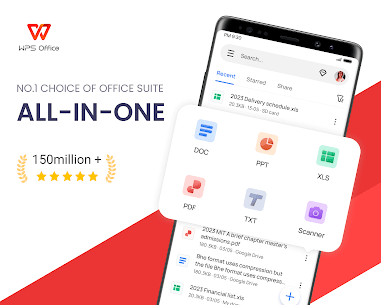
The suite integrates four essential modules into a single, streamlined application: WPS Writer for document creation, WPS Spreadsheets for data management, WPS Presentation for slideshow creation, and robust PDF tools for viewing, editing, and converting documents. This all-in-one approach distinguishes WPS Office from competitors who often require separate applications for different tasks.
Core Features and Capabilities
Comprehensive Office Tools
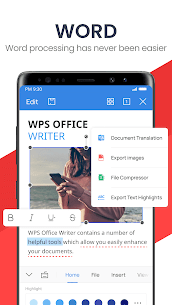
WPS Writer serves as the word processing powerhouse, offering everything from basic text editing to advanced document formatting. Users can create professional documents, reports, essays, contracts, and more with an extensive range of fonts, styles, and formatting options. The application includes built-in spell-checking and grammar tools, track changes functionality, and commenting features that facilitate collaborative work.
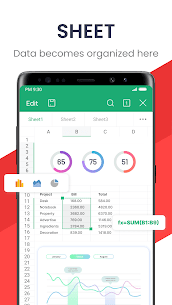
WPS Spreadsheets provides robust data management capabilities with support for hundreds of formulas, pivot tables, and data visualization through various chart types. Whether you’re managing personal finances, analyzing business data, or creating complex financial models, the spreadsheet module delivers the functionality users expect from premium software.
WPS Presentation enables users to create engaging slideshows with professional templates, animations, transitions, and multimedia support. The presentation tool includes features like slide layouts, speaker notes, and the ability to embed videos and audio, making it suitable for everything from classroom presentations to corporate pitches.
Advanced PDF Functionality
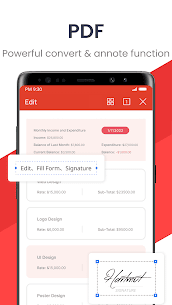
One standout feature of WPS Office is its integrated PDF toolkit, which eliminates the need for separate PDF software. Users can open, view, edit, annotate, and digitally sign PDF documents directly within the application. The suite also offers seamless conversion between office documents and PDF format, supporting bidirectional conversions that maintain formatting integrity. This comprehensive PDF support makes WPS Office particularly valuable for users who frequently work with various document types.
AI-Powered Features
WPS Office has embraced artificial intelligence to enhance productivity and streamline workflows. The WPS AI integration offers several innovative capabilities including AI-generated content creation, parallel translation features, AI-powered OCR for text extraction from images, and intelligent document summarization. The parallel translation feature is particularly noteworthy, allowing users to view original text and translations side-by-side while maintaining document formatting. This advanced functionality leverages OpenAI language models to deliver high-quality translations that surpass traditional online translation services.
Cloud Integration and Collaboration
Modern productivity demands seamless access to files across multiple devices, and WPS Office delivers with robust cloud integration. The application provides 1GB of free cloud storage through WPS Cloud and supports integration with popular services including Google Drive, Dropbox, OneDrive, Box, and Evernote. This multi-cloud approach ensures users can access their documents anytime, anywhere, regardless of their preferred cloud storage provider.
The collaboration features enable real-time document sharing and editing, making team projects more efficient. Multiple users can work on the same document simultaneously, with changes synchronized automatically. Files can be easily shared through various channels including email, instant messaging apps, NFC, and social media platforms.
Platform Compatibility and Accessibility
WPS Office demonstrates exceptional versatility by supporting virtually every major operating system and device type. The application runs seamlessly on Windows, macOS, Linux, Android, iOS, iPadOS, ChromeOS, and even HarmonyOS. This cross-platform compatibility ensures users can maintain consistent workflows regardless of their device preferences or work environment.
The mobile versions of WPS Office deserve special attention for their optimization and functionality. The Android and iOS apps provide touch-optimized interfaces that make document editing on smartphones and tablets surprisingly efficient. Features like multi-window support, night mode for comfortable reading, and mobile view modes demonstrate thoughtful design that acknowledges how users actually work on mobile devices.
File Format Compatibility
One of the most critical factors when choosing office software is file format compatibility, and WPS Office excels in this area. The suite provides seamless compatibility with Microsoft Office file formats, including DOCX, XLSX, PPTX, DOC, XLS, and PPT. This means users can open, edit, and save documents created in Microsoft Office without worrying about formatting issues or compatibility problems.
Beyond Microsoft formats, WPS Office supports an extensive range of file types including TXT, RTF, CSV, HTML, and various image formats. This broad compatibility makes it easy to work with colleagues, clients, or classmates who use different software, ensuring smooth collaboration regardless of platform preferences.
WPS Office Premium Features
While the free version of WPS Office provides comprehensive functionality for most users, the premium subscription unlocks additional advanced features. The WPS Office Premium Unlocked version removes advertisements that appear in the free tier and provides access to enhanced PDF editing capabilities, advanced OCR technology for text extraction from images, increased cloud storage allocation, and the full suite of AI-powered features including advanced document generation and analysis.
The premium subscription allows usage on up to nine devices simultaneously, making it an excellent value for families or small teams. With an annual cost significantly lower than Microsoft Office subscriptions, WPS Office Premium represents an economical choice for users requiring advanced features without breaking the budget.
Comparing WPS Office to Microsoft Office
When evaluating WPS Office against the industry standard Microsoft Office, several factors deserve consideration. In terms of cost, WPS Office provides a substantial advantage with its robust free version covering essential functionality. Microsoft Office requires either a perpetual license purchase or an ongoing subscription, representing a significant ongoing expense for individuals and businesses.
Interface-wise, WPS Office offers a modern, intuitive design that users often find more contemporary and user-friendly than Microsoft’s interface. The ribbon-style layout will feel familiar to Microsoft Office users, enabling smooth transitions between platforms. However, Microsoft Office provides more extensive plugin support and advanced features for power users requiring specialized functionality.
Performance-wise, WPS Office excels with a remarkably small installation size of approximately 214MB compared to Microsoft Office’s substantially larger footprint. Despite this compact size, WPS Office handles large files efficiently without lag, making it suitable even for older computers with limited resources. The application launches quickly and responds promptly, contributing to overall productivity.
For PDF functionality, WPS Office includes comprehensive tools built into the main application, while Microsoft Office requires separate software or subscriptions for equivalent capabilities. This integrated approach makes WPS Office more convenient for users who regularly work with PDF documents.
Getting Started with WPS Office
Beginning with WPS Office is straightforward. Users can download the application from the official WPS Office website at www.wps.com or through the Google Play Store for Android devices. The installation process is quick and uncomplicated, with the lightweight package downloading rapidly even on slower internet connections.
Upon first launch, users can create a free WPS account to access cloud storage and synchronization features. The interface welcomes users with a clean, organized layout displaying recently accessed documents and easy access to templates. The template library offers hundreds of pre-designed documents, spreadsheets, and presentations covering categories like business reports, resumes, budgets, academic papers, and marketing materials.
Mobile Experience and Functionality
The mobile versions of WPS Office deliver a surprisingly comprehensive experience that rivals desktop functionality in many respects. The Android app integrates all core tools into a unified interface with intuitive touch controls optimized for smartphone and tablet use. Users can create and edit documents with full formatting capabilities, manage complex spreadsheets with formula support, and develop presentations with animations and transitions.
Unique mobile features include document scanning capabilities that convert paper documents to digital format using the device camera, mobile view mode optimized for reading documents on smaller screens, and multi-window support enabling users to reference multiple documents simultaneously. The mobile apps also support offline work, automatically syncing changes when an internet connection becomes available.
Advantages of WPS Office
WPS Office offers numerous compelling advantages that have driven its widespread adoption. The zero-cost barrier to entry makes professional-grade office software accessible to everyone, from students managing tight budgets to small businesses watching expenses. The comprehensive feature set rivals expensive alternatives while maintaining simplicity and ease of use.
Cross-platform consistency ensures users experience similar functionality regardless of device, facilitating seamless transitions between desktop work and mobile editing. The integrated approach combining word processing, spreadsheets, presentations, and PDF tools into a single application reduces software clutter and simplifies workflows.
The active development and regular updates demonstrate WPS Office’s commitment to improvement and innovation. Recent updates have introduced AI capabilities, enhanced collaboration features, and improved performance, keeping the software competitive with industry leaders.
Potential Considerations
While WPS Office excels in many areas, potential users should consider certain factors. The free version displays advertisements, though these are generally unobtrusive and can be removed with a premium subscription. Some advanced features available in Microsoft Office may not have direct equivalents in WPS Office, potentially affecting power users with specialized needs.
File compatibility, while excellent overall, can occasionally encounter formatting discrepancies with extremely complex documents featuring advanced Microsoft Office-specific features. However, such issues are relatively rare and typically affect only edge cases rather than everyday usage.
WPS Office for Different User Types
Students find WPS Office particularly appealing due to its free availability and comprehensive functionality. The software handles everything from essay writing to research paper formatting, complex data analysis for science projects, and presentation creation for class assignments. The mobile apps enable students to work on assignments between classes or during commutes, maximizing productivity.
Professionals benefit from WPS Office’s compatibility with corporate environments where Microsoft Office dominates. The ability to seamlessly open and edit documents shared by colleagues ensures smooth collaboration without compatibility headaches. The PDF editing capabilities prove especially valuable for contract review, form completion, and document signing without requiring additional software.
Small businesses and startups appreciate the cost savings WPS Office enables without sacrificing essential functionality. The multi-device licensing with premium subscriptions allows entire small teams to access advanced features at a fraction of Microsoft Office’s cost. Cloud collaboration features facilitate remote work and team coordination, increasingly important in modern business environments.
Security and Privacy
WPS Office takes data security seriously, implementing encryption for documents stored in WPS Cloud and ensuring data remains private throughout the creation, editing, and storage process. The company maintains that user data is not shared with third parties, providing peace of mind for users handling sensitive information. Documents can be password-protected for an additional security layer when sharing sensitive files.
Template Library and Productivity Tools
The extensive template library represents one of WPS Office’s most valuable features, offering thousands of professionally designed templates across various categories. Business templates include invoices, proposals, reports, and organizational charts. Personal templates cover budgets, calendars, meal planners, and to-do lists. Academic templates provide formatting for essays, research papers, and bibliographies in various citation styles.
These templates significantly accelerate document creation, allowing users to focus on content rather than formatting. The templates are customizable, enabling users to adapt designs to specific needs while maintaining professional appearance.
Special Features and Tools
WPS Office includes several unique features that distinguish it from competitors. WPS Photos, an integrated image editor, provides basic to advanced photo editing capabilities including background removal, watermark elimination, quality enhancement, and format conversion. This eliminates the need for separate image editing software for many common tasks.
The document scanning feature converts physical documents to digital format using smartphone cameras, with intelligent edge detection and image enhancement producing clean, readable results. Scanned documents can be saved as images or converted to editable text using OCR technology.
The dark mode option reduces eye strain during extended work sessions or nighttime editing, while the mobile view mode optimizes documents for comfortable reading on smaller screens. The laser pointer and ink annotation tools enhance presentation delivery, allowing presenters to emphasize points and annotate slides in real-time.
WPS Office Mod APK Considerations
Some users seek WPS Office Mod APK versions that claim to offer premium features without payment. While these modified applications may provide unlocked functionality, users should exercise caution when considering such options. Modified APKs from unofficial sources pose security risks including potential malware, data theft, or compromised privacy. These versions may lack official updates, leaving users vulnerable to security vulnerabilities and missing out on new features and improvements.
The official WPS Office application already provides extensive free functionality suitable for most users, and the premium subscription cost remains reasonable for those requiring advanced features. Supporting developers through legitimate purchases ensures continued software development and improvement while maintaining security and reliability.
Updates and Future Development
WPS Office maintains an active development schedule with regular updates introducing new features, performance improvements, and bug fixes. Recent updates have focused on AI integration, cloud collaboration enhancements, and mobile experience refinement. The development team demonstrates responsiveness to user feedback, frequently implementing requested features and addressing reported issues.
Looking forward, WPS Office continues investing in AI capabilities with plans to expand automated features for data analysis, document creation, and intelligent assistance. Enhanced collaboration tools and deeper integration with productivity services suggest WPS Office’s commitment to remaining competitive in the evolving productivity software landscape.
Getting the Most from WPS Office
To maximize WPS Office’s potential, users should explore the template library for time-saving starting points, utilize keyboard shortcuts for common tasks, take advantage of cloud storage for document backup and cross-device access, and explore AI features for content generation and translation. Setting up WPS Cloud synchronization ensures work is never lost and remains accessible across devices.
The official WPS Office Academy website offers tutorials, tips, and guides helping users master various features and workflows. The active user community provides additional resources, troubleshooting assistance, and creative usage ideas.
Conclusion
WPS Office represents a remarkable achievement in productivity software, delivering professional-grade functionality without the financial burden of traditional office suites. Its comprehensive feature set, cross-platform availability, excellent file compatibility, and innovative AI integration make it a compelling choice for diverse users. Whether you’re a student managing coursework, a professional handling business documents, or an individual organizing personal projects, WPS Office provides the tools necessary for success.
The combination of free accessibility and optional premium upgrades ensures users can choose the level of functionality matching their needs and budget. As WPS Office continues evolving with regular updates and feature additions, it solidifies its position as a serious alternative to expensive office suites, democratizing access to powerful productivity tools for users worldwide.
What's new
WPS AI offers AI-powered capabilities for text writing, editing, and translating, as well as image editing:
1. AI Translate: Translates text accurately and maintains original formats. Supports 105 languages.
2. Scanner: Generates clear scanned copies, supports handwriting extraction, and allows exporting scanned copies as editable files.
3. Read Aloud: Generates lifelike, smooth, and emotional voice outputs.
Download links
An ad will pop up before the download. Close it, click download again—ads keep us going, thanks!


