
FL STUDIO MOBILE

FL Studio Mobile APK Info
Many producers look for the FL Studio Mobile APK Download to manually install the workstation on their Android devices. The APK (Android Package Kit) contains the full architecture of the mobile DAW, including its step sequencer, piano roll, and instrument library. While obtaining the APK file allows for sideloading on devices that may not have standard access to app stores, users should be cautious. To ensure the stability of your projects and access to the latest features—such as the new tuner or cloud integration—it is strongly recommended to download the application directly from the Google Play Store or Image-Line’s official channels. This guarantees a legitimate, virus-free version that receives automatic updates and full technical support.
Images

Description
In the rapidly evolving landscape of music production, the barrier to entry has never been lower. Gone are the days when producing a professional-sounding track required thousands of dollars in hardware, racks of synthesizers, and a dedicated studio space. Today, a complete music studio fits comfortably in your pocket. At the forefront of this mobile revolution is FL Studio Mobile.
Table of Contents
Developed by Image-Line, the creators of the legendary FL Studio desktop DAW (formerly FruityLoops), FL Studio Mobile is not merely a sketchbook for musical ideas; it is a robust, multi-track recording studio designed to bridge the gap between inspiration and production. Whether you are a seasoned producer looking to compose on the go or a beginner taking your first steps into beat-making, this application promises a workflow that is both accessible and surprisingly deep.
This comprehensive guide will explore every facet of FL Studio Mobile, from its touch-optimized interface and sound library to its mixing capabilities and interoperability with the desktop version. We will dissect what makes it a powerhouse for mobile musicians and where it stands in the hierarchy of modern music production tools.
The User Interface: Touch-First Design
One of the most significant challenges in porting a complex Digital Audio Workstation (DAW) to a mobile device is screen real estate. Desktop DAWs rely on mouse clicks, keyboard shortcuts, and multiple monitors. FL Studio Mobile tackles this by rebuilding the experience from the ground up with a touch-first philosophy.
The Home Panel & Workspace
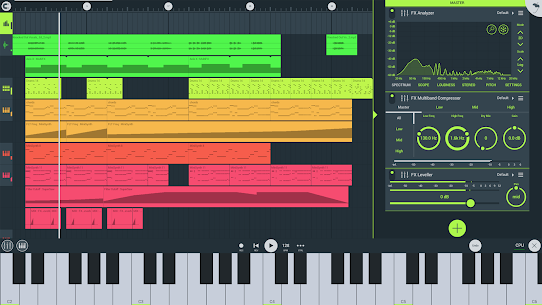
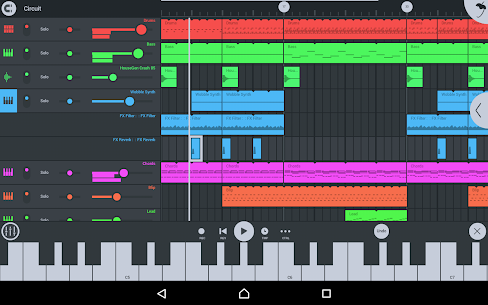
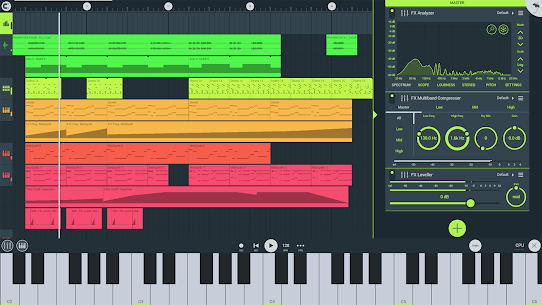
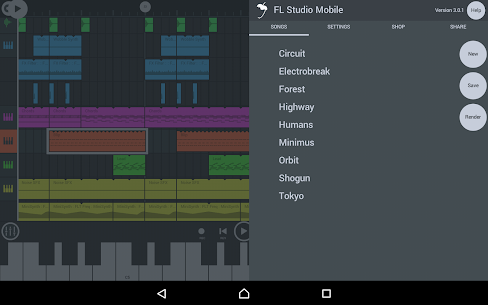
Upon launching the app, users are greeted by a clean, modern interface that prioritizes the Playlist view. The design language is flat and vector-based, ensuring that controls look sharp on everything from a 5-inch phone screen to a 12-inch tablet or a 4K Chromebook monitor.
The top bar serves as the command center, housing transport controls (Play, Record, Tempo), the Metronome, and the essential FL Studio icon, which opens the main menu for saving, exporting, and settings.
The Navigation Tab
Navigation in FL Studio Mobile is distinct from its desktop counterpart. Instead of floating windows that can clutter a small screen, the app uses a tabbed system located on the left or right side of the screen (customizable in settings). These tabs allow you to instantly switch between the five core views:
- Playlist: The arrangement view where clips are sequenced.
- Channel Rack: Where instruments are loaded and basic steps are programmed.
- Piano Roll: The melodic editing suite for detailed note manipulation.
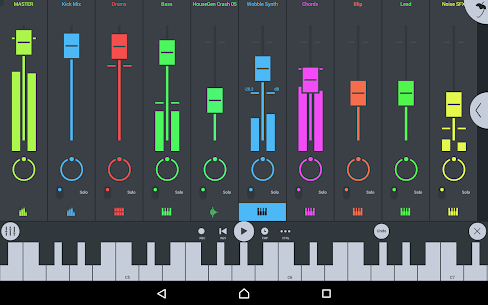
- Mixer: A dedicated screen for balancing audio levels and adding effects.
- Effects Rack: A focused view for tweaking the parameters of specific plugins.
This “modal” approach ensures that whichever task you are performing—whether it’s EQing a snare or drawing a bassline—you have the full screen devoted to it.
Core Features: The Building Blocks of a Track
To understand the power of FL Studio Mobile, one must understand its three pillars of creation: The Step Sequencer, the Piano Roll, and the Audio Recording capabilities.
1. The Step Sequencer
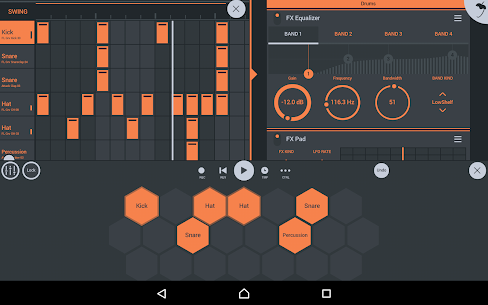
For Hip Hop, EDM, and Techno producers, the Step Sequencer is the heart of the workflow. Just like the desktop version, this feature allows you to input drum patterns by simply tapping buttons on a grid.
- Instant Gratification: You can build a “Four-on-the-Floor” house beat in seconds by tapping the 1, 5, 9, and 13 steps on a kick drum channel.
- Graph Editor: By expanding the sequencer, you gain access to the Graph Editor, which allows you to adjust the velocity, pitch, and pan of each individual step. This is crucial for adding “groove” and humanization to robotic drum loops.
2. The Piano Roll
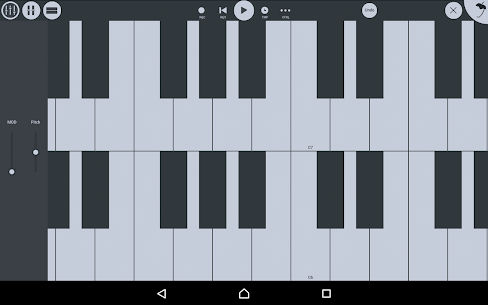
While the Step Sequencer is great for drums, the Piano Roll is where melodies come alive. It is widely considered one of the best MIDI editors on any mobile platform.
- Touch Input: You can draw notes with your finger, resize them by dragging the edges, and move them chromatically up and down the scale.
- Zoom and Scroll: The pinch-to-zoom gesture feels natural, allowing you to dive in for microscopic edits or zoom out to see the entire chord progression.
- Magnet Snap: The grid snapping options (1/4 beat, 1/6 step, etc.) ensure your notes are always on time, though “Line” or “None” settings are available for free-form jazz or neo-soul timing.
3. Audio Recording
FL Studio Mobile transforms your device into a multi-track recorder.
- Microphone Input: You can record vocals or acoustic instruments directly through your phone’s built-in microphone. For professional results, the app supports USB audio interfaces, allowing you to connect XLR microphones and guitars directly to your mobile device (via USB-OTG adapters).
- Stem Import: Producers can import full-length WAV stems. This is a game-changer for remixing; you can load a vocal stem from a collaborator and build a completely new track around it within the app.
Instruments and Sound Library
A DAW is only as good as the sounds it provides. FL Studio Mobile comes with a surprisingly versatile library, split between “Generators” (Synths) and Sample players.
Included Synthesizers
- MiniSynth: The workhorse of the app. It is a subtractive synthesizer with a straightforward interface. It features oscillators, filters, LFOs, and envelopes. Despite its name, it is capable of thick basslines and searing leads.
- GMS (Groove Machine Synth): A port of the desktop plugin, GMS is a powerhouse for aggressive EDM sounds, offering multitimbral hybrid synthesis.
- Transistor Bass: A faithful emulation of the legendary Roland TB-303. This module is essential for Acid House and Techno, providing that squelchy, resonant bass sound defined by the “Cutoff” and “Resonance” knobs.
- SuperSaw: Dedicated to creating the massive, detuned saw-wave chords famous in Trance and Future Bass music.
- 3x Osc: A streamlined version of the classic desktop plugin, perfect for designing fundamental sounds like sub-basses and chiptune leads.
Samplers and DirectWave
- DirectWave: This is the primary sample player. It supports multi-sampled instruments, meaning a piano patch isn’t just one recording pitch-shifted, but multiple recordings of different keys and velocities.
- Note: While the player is free, the full version (which allows deep editing and creating your own programs) is often an In-App Purchase depending on the platform.
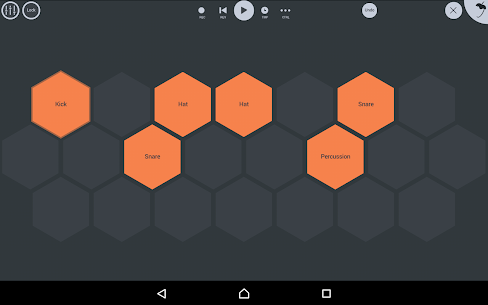
- Drum Sampler: This module powers the drum tracks. It allows you to mix and match samples (Kick, Snare, Hi-Hat) into a custom kit. You can adjust the pitch and envelope of every single drum hit individually.
In-App Purchases (IAP) vs. Included Content
The base version of FL Studio Mobile includes a solid starter pack of sounds. However, Image-Line offers a “Shop” within the app.
- Varazdin Orchestral: A high-quality set of strings, brass, and woodwinds.
- Synth Expansions: Specialized packs for GMS and MiniSynth tailored to genres like Synthwave, Trap, or Lo-Fi.
- Sample Packs: Genre-specific drum and loop collections.
- Verdict: While the paid content is high quality, the stock sounds are sufficient for beginners. Advanced users can bypass the shop entirely by importing their own WAV samples from their device storage.
Mixing and Effects
The mixing console in FL Studio Mobile is where the track comes together. It mimics a hardware mixing desk, with faders for volume, knobs for panning, and slots for effects.
The Effect Rack
Each channel (instrument) can have a chain of effects applied to it. The processing order matters—placing a reverb before a distortion creates a very different sound than distortion before reverb.
- Parametric EQ: The most important tool for mixing. It allows you to visually carve out frequencies. You can boost the bass on a kick or cut the “mud” out of a melody.
- Compressor & Limiter: Essential for dynamics control. The Limiter is particularly useful on the Master channel to make the track loud without distorting (clipping).
- Auto Ducker: A sidechain compression tool. This is what creates the “pumping” effect in House music where the bass volume dips every time the kick drum hits.
- Creative Effects: The list includes Chorus, Flanger, Phaser, Delay (with tempo sync), and a variety of Filters (Low Pass, High Pass, Vowel/Formant).
Automation
Automation is what separates a static loop from a dynamic song. In FL Studio Mobile, you can automate almost anything.
- Recording Automation: You can hit “Record,” play your track, and twist a filter knob in real-time. The app records your movement and draws it as a line on the playlist.
- Drawing Automation: You can manually draw curves to fade volume in/out, sweep a filter, or change the pitch over time.
Workflow Guide: Making Your First Beat
For those new to the app, the blank screen can be intimidating. Here is a step-by-step workflow to create a basic Trap beat.
Step 1: Set the Tempo Tap the Tempo display at the top. For Trap, set it between 130 and 150 BPM (Beats Per Minute).
Step 2: The Drum Foundation
- Open the Channel Rack.
- Add a Drum Sampler.
- Tap the “Step Sequencer” view.
- Kick: Place a kick on the 1st beat.
- Clap/Snare: Place a clap on the 3rd beat (or step 9 in the sequencer).
- Hi-Hats: Fill every 2 steps for a basic roll. To do “triplet rolls,” long-press a step and use the “note repeat” function.
Step 3: The Melody
- Add a MiniSynth channel.
- Select a “Pluck” or “Bell” preset.
- Open the Piano Roll.
- Draw in a minor chord progression (e.g., C minor). Keep the melody repetitive and catchy.
Step 4: The 808 Bass
- Add a Transistor Bass or an 808 sample in DirectWave.
- In the Piano Roll, follow the root notes of your melody.
- Use the Slide feature (if using a synth) to make the bass glide between notes.
Step 5: Arrangement
- Switch to the Playlist View.
- Select your drum pattern and “paint” it for 8 bars.
- Select your melody pattern and paint it on top.
- To create an intro, remove the drums from the first 4 bars.
- To create a drop, ensure all elements play together at bar 9.
Step 6: Export
- Tap the FL Studio icon > Save.
- Choose MP3 (for sharing) or WAV (for high quality).
- Select “High Quality” rendering and hit Export.
Advanced Features and Connectivity
FL Studio Mobile is not an island. It is designed to integrate into a larger ecosystem of production hardware and software.
MIDI Controller Support
One of the app’s strongest features is its ability to recognize external hardware.
- USB-OTG: You can plug a USB MIDI keyboard (like an Akai MPK Mini or Novation Launchkey) into your phone using an adapter. The app instantly maps the keys to the currently selected instrument.
- Bluetooth MIDI: For a wire-free experience, it supports Bluetooth LE MIDI controllers, which is perfect for iPad producers who want a minimalist setup.
- Knob Mapping: You can “Link to Controller” virtually any knob in the app. Right-click (or long-press) a filter knob, select “Link,” and twist a physical knob on your controller to create a permanent binding.
Desktop Integration: The FL Studio Plugin
This is the “killer feature” for users of the desktop version.
- The Plugin Version: You can load FL Studio Mobile inside FL Studio Desktop as a VST plugin.
- Seamless Transfer: You can start a project on your phone while on the bus. When you get home, connect your phone to your PC, transfer the file, and open it inside the desktop plugin. It sounds exactly the same. From there, you can drag the MIDI and Audio out of the mobile plugin and onto the desktop playlist to finish the track with high-end PC-only plugins (like Serum or Ozone).
File Management
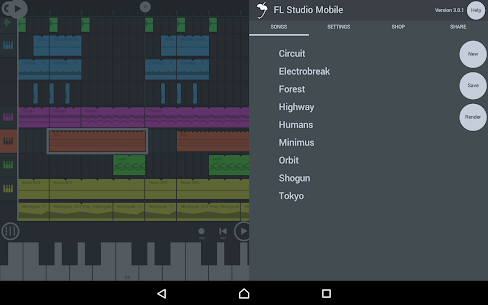
The app supports extensive file handling. You can zip entire projects (including custom samples) to share with friends or backup to the cloud. With the release of recent updates, integration with FL Cloud allows for easier access to samples and loops directly within the mobile environment.
Pros and Cons: An Honest Assessment
No software is perfect, and mobile DAWs have inherent limitations compared to their desktop siblings.
Pros
- Portability: The ability to make genuine music anywhere—on a plane, in a park, or in bed—is unmatched.
- Cost-Effective: For roughly $15, you get a studio that would have cost thousands a decade ago.
- Battery Efficiency: The audio engine is highly optimized. You can produce for hours without draining your battery instantly, unlike some heavier competitors.
- Desktop Companion: It creates a bridge between mobile ideas and studio completion that no other DAW executes as smoothly.
- Vector Interface: It scales beautifully to any screen size, making it future-proof for new devices.
Cons
- Screen Size Limitations: On smaller phones, the interface can feel cramped. Precise automation editing often requires zooming in and out constantly.
- No Third-Party VSTs: You cannot run desktop plugins like Serum, Massive, or FabFilter inside the mobile app. You are limited to the internal modules (though they are very capable).
- CPU Limits: While optimized, a complex project with 20+ tracks and heavy effects can cause audio crackling (buffer underruns) on older or budget devices.
- Touch Latency: Depending on the Android device, there can be a slight delay between tapping a drum pad and hearing the sound. iOS devices generally fare better in this regard due to Core Audio.
User Reception and Community
The community surrounding FL Studio Mobile is vast and active. A quick search on YouTube reveals millions of views on tutorials, “beat cookups,” and full songs made entirely on phones.
The “Mobile Producer” Identity There is a growing subculture of producers who work exclusively on mobile. They argue that the limitations of the platform foster creativity. Instead of spending hours scrolling through 10,000 kick drums on a PC, mobile users are forced to make quick decisions and focus on the musicality of the track.
Critical Reception Reviews on the Google Play Store and Apple App Store are generally positive (averaging 4.0+ stars).
- Common Praise: Users love the updates. Image-Line is known for their “Lifetime Free Updates” policy on desktop, and they treat mobile similarly, constantly adding new features like the Tuner, Analyzer, and new synths for free or low cost.
- Common Complaints: The most frequent complaints revolve around file management on Android (due to Google’s changing “Scoped Storage” rules) and the learning curve. It is professional software, not a game, and it requires patience to learn.
Conclusion
FL Studio Mobile is more than just an app; it is a testament to how far mobile computing has come. It successfully democratizes music production, placing professional-grade tools into the hands of anyone with a smartphone.
Is it a replacement for a fully decked-out recording studio with $5,000 speakers and analog compressors? No. But it isn’t trying to be. It is the ultimate sketchpad and a surprisingly capable production environment in its own right.
For the professional, it is a travel companion that ensures no idea is lost. For the beginner, it is an affordable education in audio engineering, teaching the fundamentals of mixing, sequencing, and synthesis without the intimidation of a complex desktop setup.
In a world where content is created at the speed of thought, FL Studio Mobile ensures that your music keeps up. Whether you are creating the next viral Trap beat or scoring a short film on your tablet, FL Studio Mobile proves that the best studio is the one you have with you.
What's new
- Fixed drums mixer layout not updated when adding a new empty lane - Fixed send channel colours not saved with the project - Added drum send support to FLP project export
Video
Download links
An ad will pop up before the download. Close it, click download again—ads keep us going, thanks!


